GitHub

Fox Red Labs / Hardware / Add-ons and parts

Add-ons and parts, from any maker

The screens, sensors, motor drivers, probes and cables the builds use, whoever makes them, and where to get them.

45 parts, each used in a project here. A card gives what it is for, how to hook it up, where to buy it and which projects use it. The boards are on Hardware.

Every board here runs at 3.3 V; a part that needs 5 V says so. A seller is a link only when that page was opened and the part was found there. Terms.

Plug-on boards (BoosterPack plug-in modules) and debuggers

ordered 2026-10-04.

LP-XDS110ET debugger

TI's stand-alone debug probe with EnergyTrace: powers, programs and measures the current of boards that have no built-in debugger, such as the LP-EM radio boards.
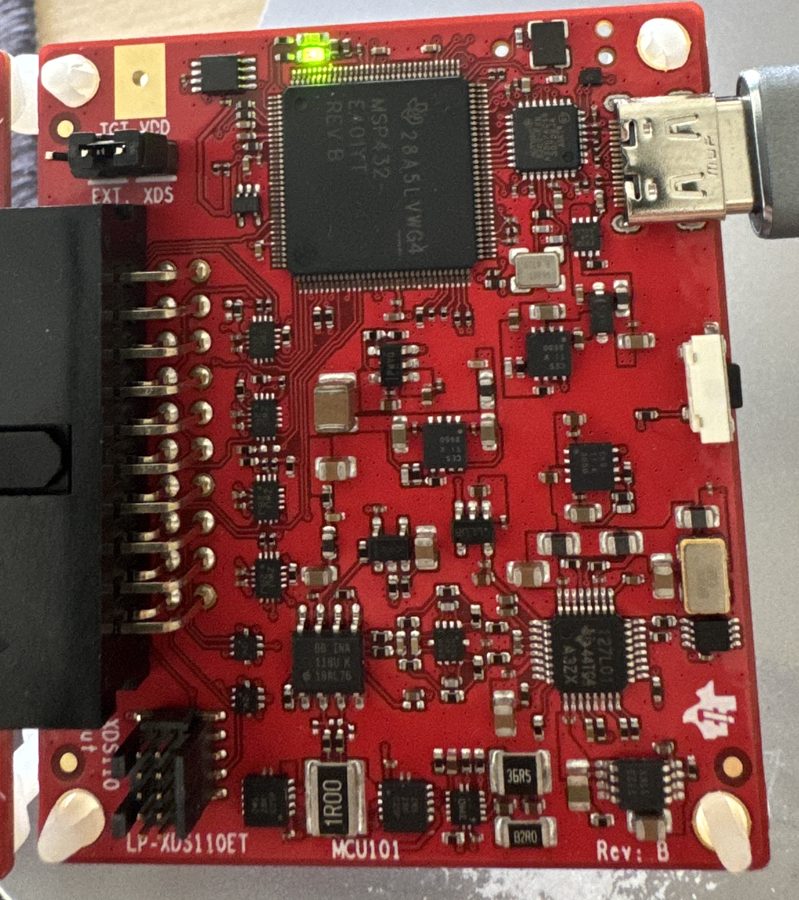
LP-XDS110ET debugger
Use it for
  • Programming CC2340R5, CC2755 and CC35xx boards
  • Measuring a board's current with EnergyTrace (700 nA to 400 mA per TI's quick start guide)
  • A serial port to the Mac for the board's text output
Hook it up
USB-C to the Mac (cable in the box). The LP-EM board's 20-pin edge goes into the probe's 20-pin socket. TGT VDD jumper on XDS when the probe powers the board (CC2340R5, CC2755P10, and needed for EnergyTrace); on EXT when the board powers itself (CC35X1). One LP-EM board at a time.

Where to buy: TI.com, LP-XDS110ET.

in hand, stacked on the LP-MSPM33C321A.

BOOSTXL-EDUMKII Educational BoosterPack MKII

A plug-on board full of inputs and outputs.

More
a 128 x 128 color screen, joystick, two buttons, buzzer, color LED, microphone, accelerometer, light sensor and a servo header.
Use it for
  • Games and menus on the color screen
  • Joystick and button demos
  • Sound and light demos
Hook it up
Needs 3.3 V and 5 V. Plugs straight onto the MSPM0 G3507 (pull J8, J9, J16 to J18; J21 and J22 down) and nearly onto the G3519, CC1354P10, MSPM33C321A and AM13E230. The L1306, CC2340R5 and F2800137 lose parts and need a wire for the screen (pin 31). Does not fit the C1104. Jumper J5 on the board: 2-3 for the screen backlight.

Where to buy: TI.com, BOOSTXL-EDUMKII.

Doom on a TI boardRetro games on a TI LaunchPadSnake is drawn on the Educational BoosterPack screen from the LP-MSPM33C321AThree Arduboy games and a Game Boy emulator run on the Educational BoosterPack screen from an LP-MSPM33C321AA Game Boy game plays at full console speed on the Educational BoosterPack screen
in hand, stacked on the LP-MSPM0G5187.

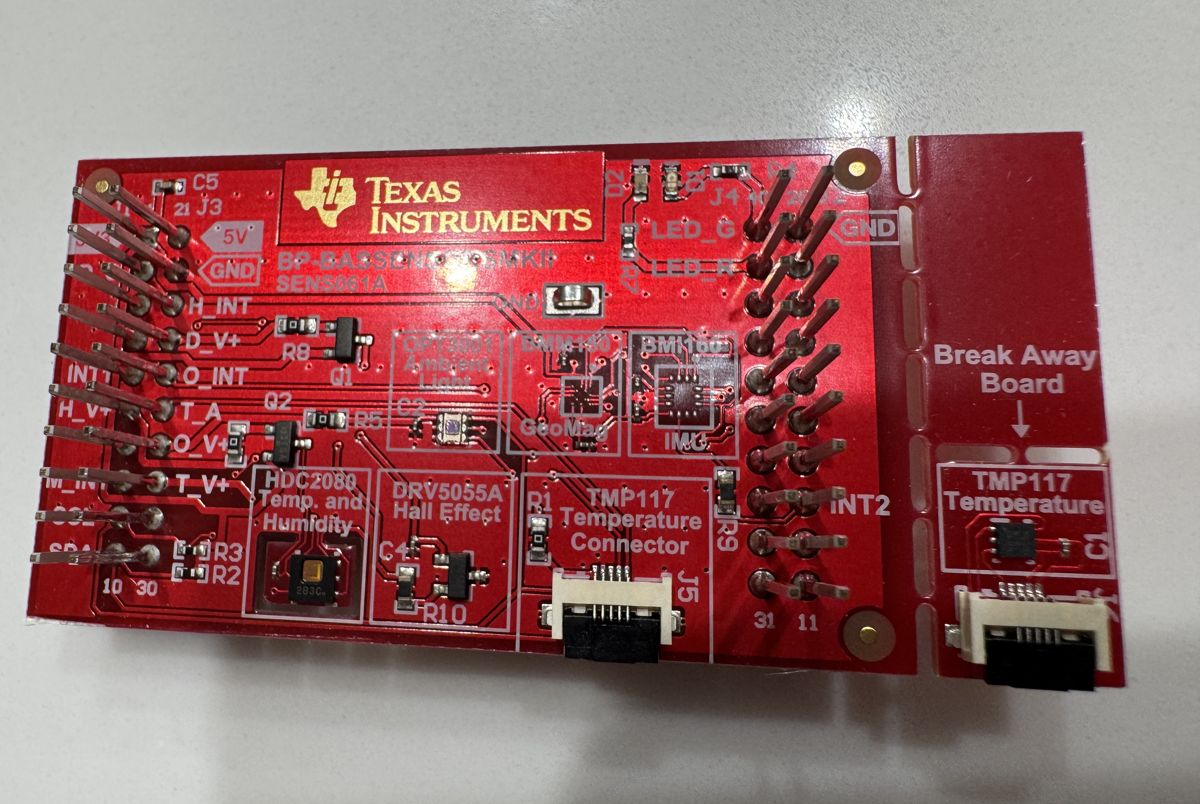
BP-BASSENSORSMKII Sensors BoosterPack plug-in module

A plug-on board of TI and Bosch sensors on one I2C bus.

BP-BASSENSORSMKII Sensors BoosterPack plug-in module
Status
in hand, stacked on the MSPM0 G5187: humidity and temperature, light and the magnet sensor read live; the BMI160 did not answer and the TMP117 needs its ribbon cable; see its guide.
More
The TMP117 reads temperature and sits on a break-away board with a ribbon cable. The HDC2080 reads temperature and humidity, the OPT3001 light, the BMI160 motion, with a BMM150 compass behind it, and the DRV5055 a magnet. Red and green LEDs.
Use it for
  • Weather and room-comfort demos
  • Motion and tilt demos
  • The same sensor demo on every MSPM0 board
Hook it up
Plugs on (I2C on pins 9, 10; pull-ups on the board). Plug the ribbon cable into J5 and J6 or the TMP117 reads nothing. All six sensors on the G3507 (five jumpers out), G3519 and CC1354P10; the L1306 needs two wires to power the OPT3001 and TMP117; the C1104 reads two of six; the CC2755P10 needs TI's three wires; the F2800137 has no I2C on these pins.

Where to buy: TI.com, BP-BASSENSORSMKII.

in hand.

BOOSTXL-SHARP128 display BoosterPack plug-in module

A plug-on 128 x 128 black-and-white Sharp memory display with a microSD slot.

More
It draws almost no power and keeps its image.
Use it for
  • The one display that plugs onto most boards here
  • Clocks, sensor readouts, battery-powered screens
Hook it up
Uses pins 2, 5, 6, 7, 15 for the screen (8, 14, 17 for the SD card). Plugs on with no wires on the G3507, L1306, G3519, C1104, CC1354P10, MSPM33C321A and AM13E230; one wire on the F2800137 (6 to 13). The CC2340R5 and CC2755P10 need resistor work for the screen and one wire for the SD card. 3.3 V only. Pin 19 is not used as shipped.

Where to buy: DigiKey, 296-50808-ND; TI.com, BOOSTXL-SHARP128.

The Sharp128 memory screen runs from an LP-MSPM0C1104 with no frame buffer
in hand.

BOOSTXL-AUDIO audio BoosterPack plug-in module

A plug-on speaker board: a DAC8311 16-bit DAC and a TPA301 amplifier driving a small speaker, plus an electret microphone with a preamp.

Use it for
  • Sound out from a board with no audio of its own
  • Chiptune, tones and voice prompts
  • Microphone input for level meters and wake words
Hook it up
DAC8311 on SPI (pins 7, 15, 12), microphone on pin 6. Jumper J5 picks what drives the amplifier: the SPI DAC (default), the board's own DAC on pin 30, or PWM on pin 19. Plugs on with no clash on the MSPM33C321A and AM13E230; pin 6 clashes on the G3507, pins 13 and 30 on the L1306. Pins 12 and 13 are low confidence until measured.

Where to buy: TI.com, BOOSTXL-AUDIO.

in hand.

BP-CC1407P-9-FE sub-1 GHz radio BoosterPack plug-in module

A sub-1 GHz radio on a plug-on board, with no processor of its own: a LaunchPad kit drives it over SPI.

Status
in hand: first host: CC1354P10-1.
More
Up to +22 dBm, SMA antenna socket, red and green LEDs. (CC1407P, 902 to 928 MHz on this board)
Use it for
  • Long-range radio links where 2.4 GHz does not reach
  • A radio for a host chip that has none (MSPM0, MSPM33)
  • Range tests at 915 MHz
Hook it up
Plugs onto a LaunchPad kit (pins 1, 7, 14, 15, 18, 23, 36). TI supports the CC1354P10-1 and four other CC13xx/CC26xx boards with its TRX plug-in, and the CC2745R10 with a Zephyr shield. On the CC2755P10: one wire (23 to 10) and its red LED jumper off. Needs a 915 MHz SMA antenna, not in the kit.

Where to buy: TI.com, BP-CC1407P-9-FE.

Starter kits

in hand.

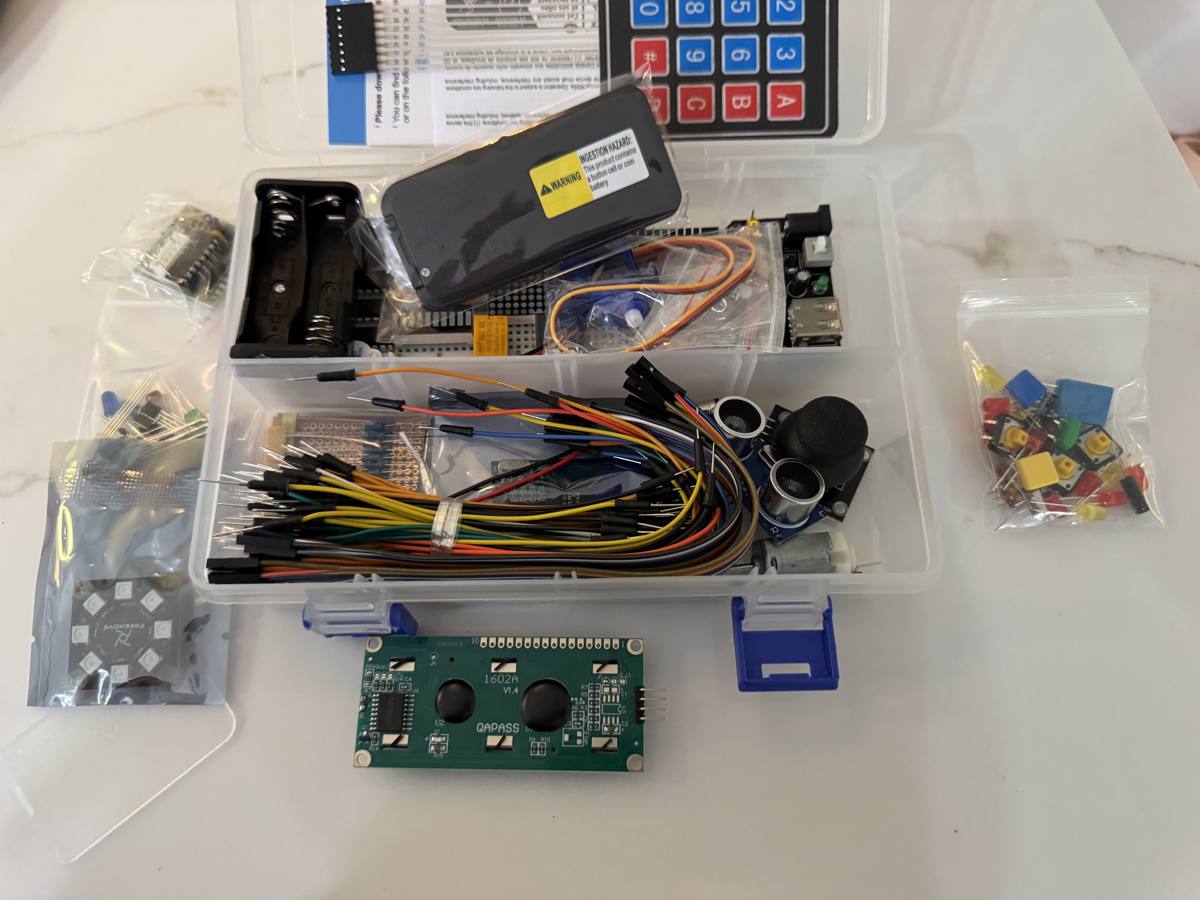
Freenove Ultimate Starter Kit for Raspberry Pi Pico, board not included (FNK0058)

A box of the classic hobby parts with a breadboard and wires.

Freenove Ultimate Starter Kit for Raspberry Pi Pico, board not included (FNK0058)
More
Made for the Pico, and most parts work at 3.3 V. The HC-SR04 and the L293D need 5 V; the LED module and LCD1602 were not checked.
Use it for
  • IR remote control
  • 7-segment counters and an 8 x 8 LED matrix
  • Keypad lock, servo, DC motor and stepper
  • DHT11 temperature and humidity, the most popular hobby demo
  • RFID, PIR motion, ultrasonic distance, LCD1602 screen
In the box
I2C LCD1602, IR remote and receiver, 4-digit and 1-digit 7-segment displays with two 74HC595, 8 x 8 LED matrix, 8-LED WS2812-type module, 4 x 4 keypad, active and passive buzzers, L293D, DC motor, servo, stepper with driver board, DHT11, thermistor, photoresistor, joystick, PIR, HC-SR04, MPU6050, RFID, relay, breadboard power module, breadboard, jumper wires (Freenove's parts list).
Hook it up
Breadboard and jumper wires. Motors and the LED module run from the breadboard power module or the LaunchPad kit's 5 V pin, grounds tied together. The HC-SR04 is a 5 V part: use the RCWL-1601 instead.

Where to buy: Amazon, B09H2SV5XB.

Displays

in hand.

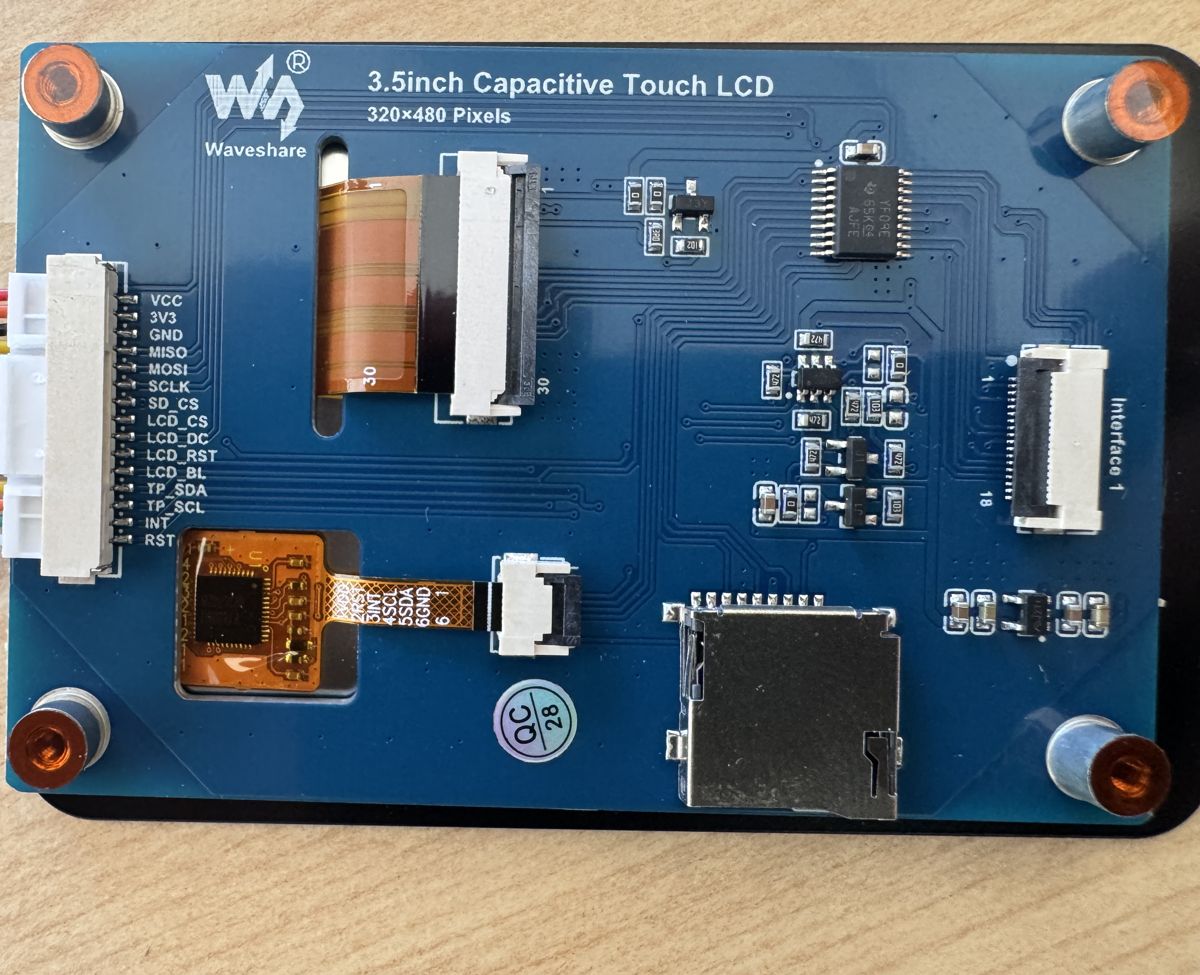
Waveshare 3.5 inch capacitive touch LCD

A 320 x 480 color screen with a finger-touch panel, wired to the board by hand.

Waveshare 3.5 inch capacitive touch LCD (ST7796S screen, FT6336U touch)
Also
ST7796S screen, FT6336U touch.
Use it for
  • Touchscreen demos: draw a digit and the board reads it
  • Photo and graphics demos
  • LVGL user interfaces
Hook it up
12 jumper wires (13 with MISO) to the MSPM0 G3507 (SPI for the screen, software I2C for touch on PB3 and PB2). Chip select needs 10 microseconds high between commands.

Where to buy: Amazon, B0DNQJD7BV.

in hand.

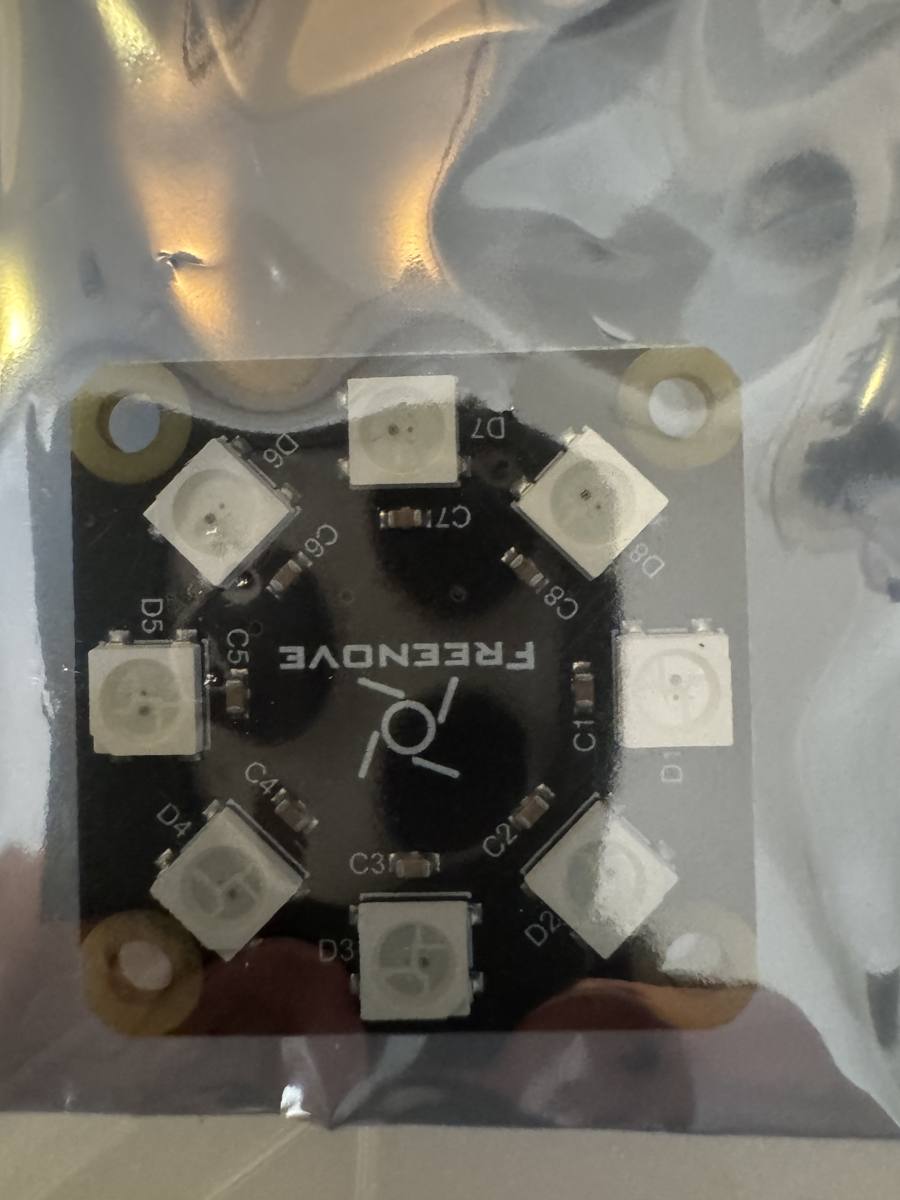
Freenove 8-LED RGB ring module, WS2812 type

Eight color LEDs in a ring on one data wire, labelled D1 to D8 on the board.

Freenove 8-LED RGB ring module, WS2812 type (from the Freenove kit)
Also
from the Freenove kit.
More
Each LED is set to any color from software.
Use it for
  • Color status light
  • Spinner and progress ring
  • Testing a WS2812 driver on a chip with no library for it
Hook it up
3 pins: 5 V power, GND, data in. Read the pin names on the board before wiring. Whether its data pin accepts 3.3 V logic on a 5 V supply is unknown.

Where to buy: Amazon (inside the Freenove kit), B09H2SV5XB.

in hand.

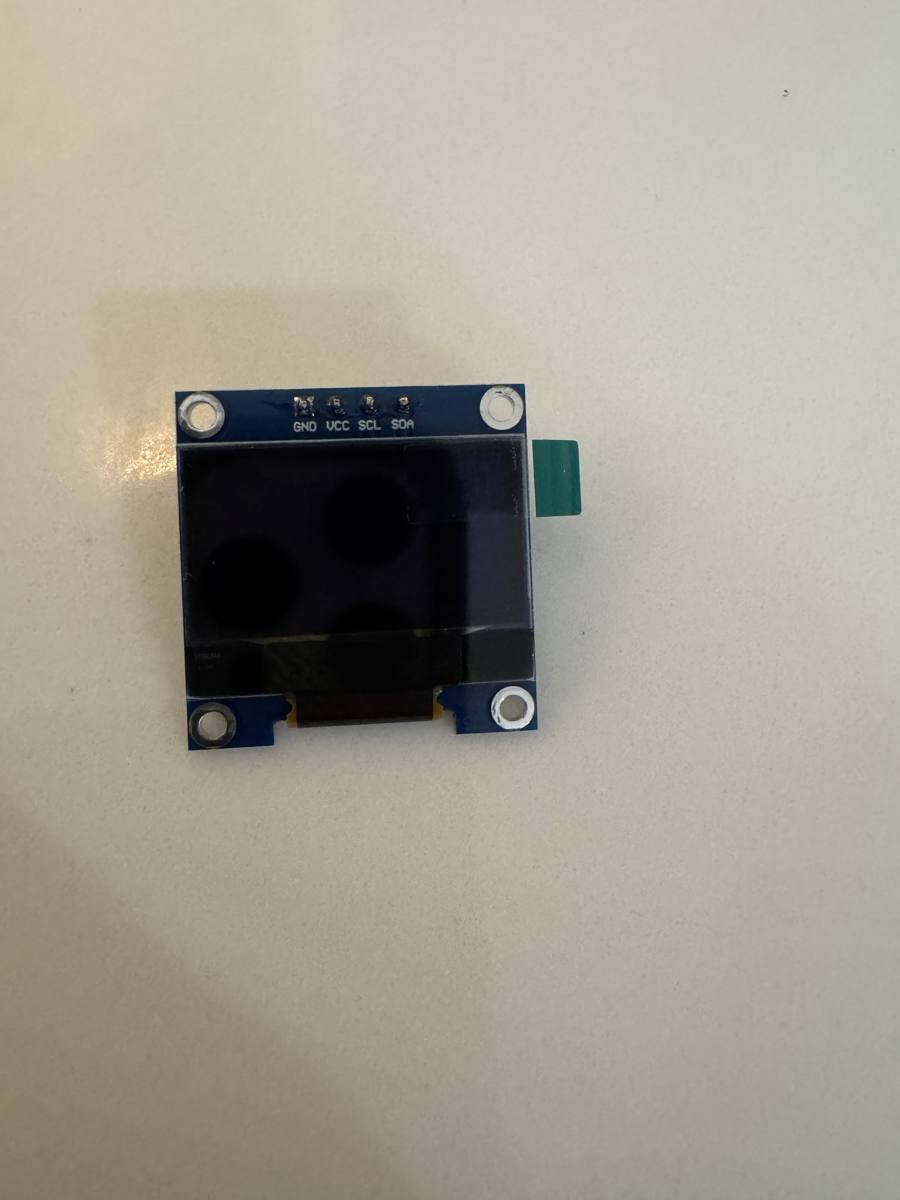
ELEGOO 0.96 inch OLED, 128 x 64, SSD1306, 3 pack

The most-used small hobby screen: sharp white-on-black text and graphics.

ELEGOO 0.96 inch OLED, 128 x 64, SSD1306, 3 pack
Use it for
  • Sensor readouts
  • Tiny games
  • Status screens on any board
Hook it up
4 wires, pins as printed on the board in this order: GND, VCC, SCL, SDA. Power it from 3.3 V (I2C address 0x3C). The order differs between makers, so wire by the printed names.

Where to buy: Amazon, B0D2RMQQHR.

in hand.

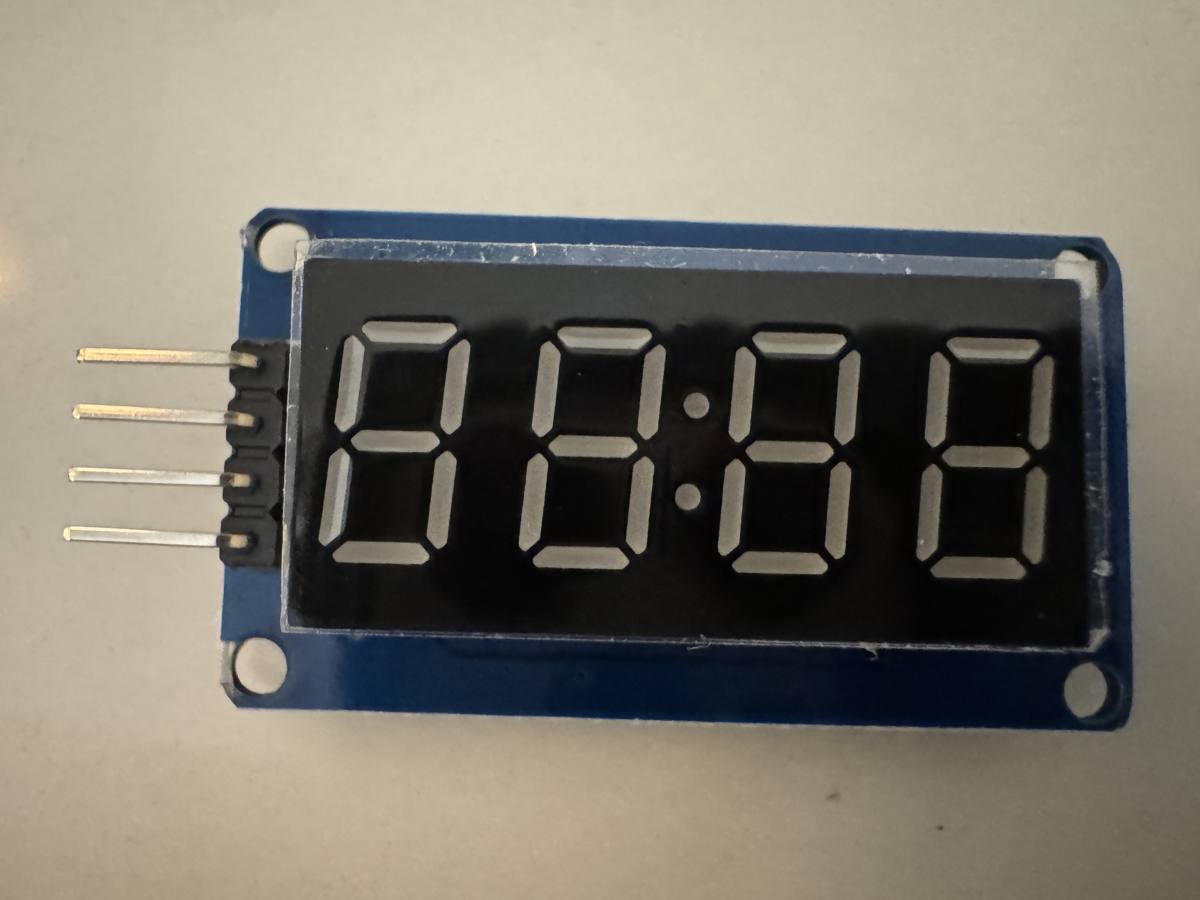
DIYables TM1637 4-digit 7-segment display with colon, 2 pack

Four big LED digits with a colon, driven over two wires.

DIYables TM1637 4-digit 7-segment display with colon, 2 pack
Use it for
  • Clocks
  • Timers and countdowns
  • Counters and scoreboards
Hook it up
4 wires: power, GND, CLK, DIO (2-wire protocol of its own, not I2C). The pin names are not readable in the photo; read them on the board before wiring. Power it from 3.3 V: the TM1637 datasheet only tests 4.5 to 5.5 V, but Seeed rates its TM1637 module for 3.3 to 5.5 V.

Where to buy: Amazon, B0BXKLZJMV.

Sensors

in hand.

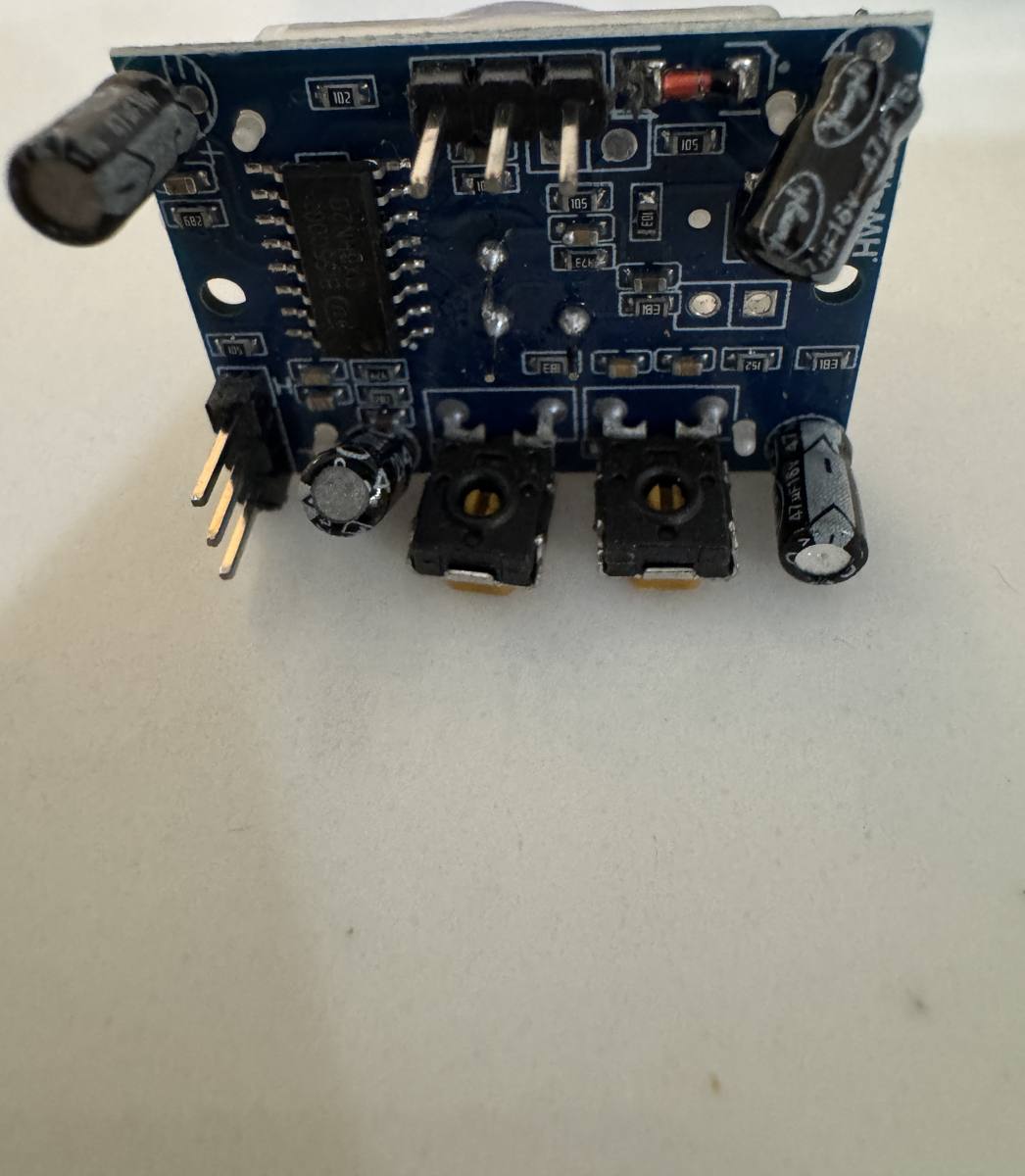
PIR motion sensor module, HC-SR501 type

Sees warm bodies move in front of it with a clear dome lens.

PIR motion sensor module, HC-SR501 type (from the Freenove kit)
Also
from the Freenove kit.
More
Two trim pots set how far it sees and how long its output stays high. Made for 5 V power; its output pin is 3.3 V.
Use it for
  • Motion-triggered light or alarm
  • Presence detection to compare against the mmWave radar
  • Wake-on-motion for a battery project
Hook it up
3 pins: power, OUT, GND. The pin names are not readable in the photo; read them on the board before wiring. Power from 5 V (the LaunchPad kit's 5 V pin or the breadboard power module); the output pin swings to 3.3 V, safe for the LaunchPad. Give it about a minute to settle after power-up.

Where to buy: Amazon (inside the Freenove kit), B09H2SV5XB.

in hand.

Adafruit VL53L1X laser distance sensor, STEMMA QT

Measures distance with an invisible laser, about 3 cm to 4 m.

Also
Adafruit 3967.
Use it for
  • Presence and proximity
  • Gesture and hand-wave demos
  • A laser ruler
Hook it up
Qwiic cable (I2C, address 0x29). Works from 3.3 V.

Where to buy: DigiKey, 1528-3967-ND.

in hand.

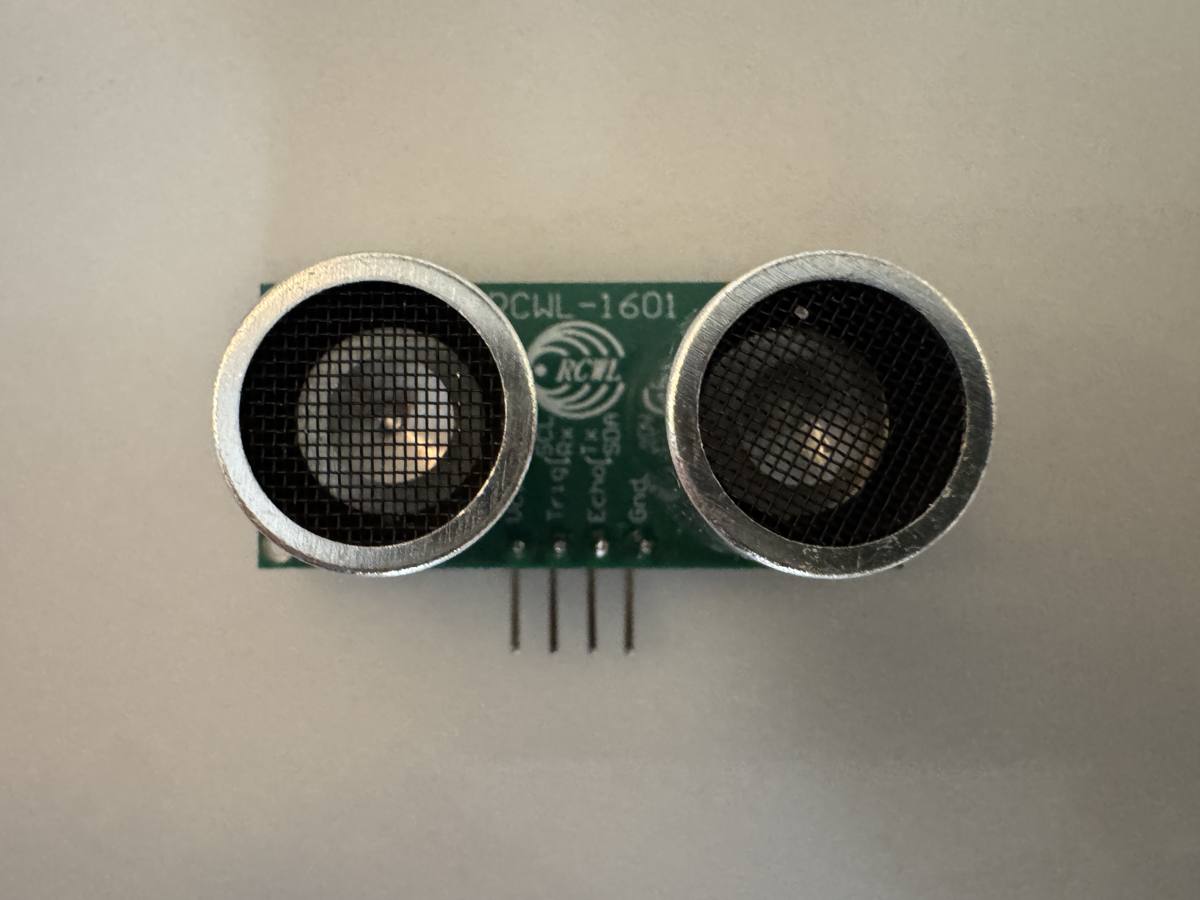
Adafruit RCWL-1601 ultrasonic distance sensor

Bounces sound off things to measure distance; a 3.3 V-safe version of the classic HC-SR04.

Adafruit RCWL-1601 ultrasonic distance sensor (Adafruit 4007)
Also
Adafruit 4007.
Use it for
  • Parking sensor
  • Robot obstacle detection
  • The HC-SR04 projects, on a 3.3 V board
Hook it up
4 pins, as printed left to right (photo, front): VCC, Trig/Rx, Echo/Tx, Gnd. The board also prints SCL and SDA beside Trig/Rx and Echo/Tx for its I2C and serial modes; for the HC-SR04 style use Trig and Echo. Works at 3 V or 5 V.

Where to buy: DigiKey, 1528-2832-ND.

in hand.

IWRL6432BOOST 60 GHz mmWave radar evaluation module

TI's low-power 60 GHz radar sensor board.

More
a radar chip with three receive and two transmit antennas on the circuit board, its own Arm Cortex-M4F at 160 MHz and a hardware accelerator for FFTs, 1 MB of RAM, an XDS110 debugger and a micro-USB port. It finds people by their motion, even small motion, and sends a point cloud and presence flags over a serial port.
Use it for
  • Presence sensing that sees a person sitting still, for Home Assistant
  • Finding out how small a host MCU can run the processor side of a radar
  • Low-power sensing: duty-cycled deep sleep, about 1 to 2 mW on the chip's rails per TI
Hook it up
Micro-USB cable (in the box) to the Mac: powers the board and gives two serial ports and JTAG. The board ships in run-from-flash mode (S1 position 1 ON, position 2 OFF); for flashing, move only S1 position 1 to OFF. There is also a reset button. BoosterPack connectors J8 and J9 for a host LaunchPad. Keep 20 cm between the board and a person. Do not drive any pin from a powered host while the board is unpowered.

Where to buy: TI.com, IWRL6432BOOST.

Motors and motor drivers

in hand.

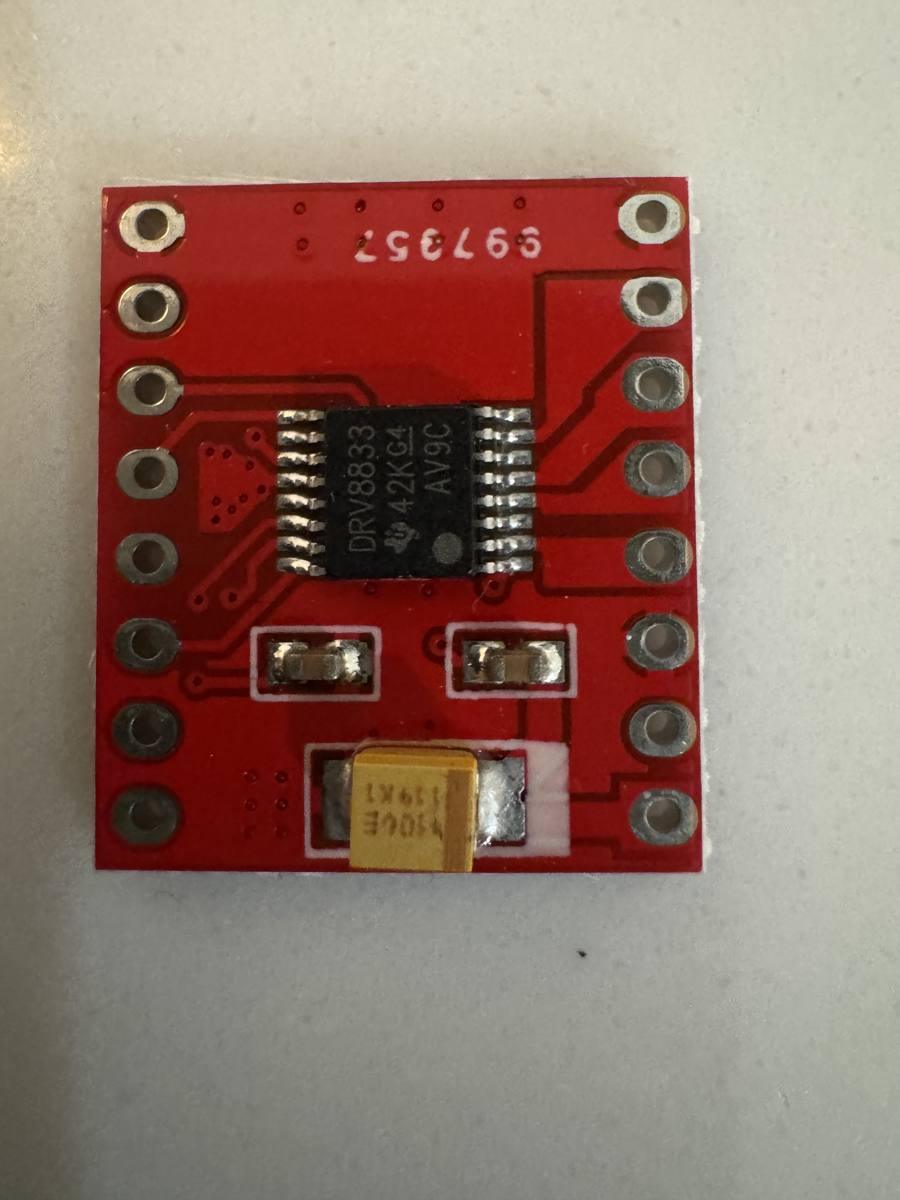
HiLetgo DRV8833 dual motor driver, 3 pack

Lets a LaunchPad kit's pin run a DC motor forward, backward and at any speed.

HiLetgo DRV8833 dual motor driver, 3 pack (TI DRV8833 chip)
Status
in hand: header pins loose, not soldered.
Also
TI DRV8833 chip.
Use it for
  • Spinning the kit's DC motor
  • Small robots and fans
Hook it up
Two pins per motor from the LaunchPad kit (3.3 V logic). Motor power from the breadboard power module, grounds tied together. Two rows of 8 holes with no header fitted; the pin names are on the back of the board, which is not in the photo: read them before wiring.

Where to buy: Amazon, B00UYIFYCW.

in hand.

DRV8376EVM three-phase motor driver evaluation module

TI's evaluation board for the DRV8376.

Status
in hand: 2026-10-15, with the motor wired.
More
a three-phase brushless motor driver with the six power transistors inside one chip, current sensing built in, and 3.3 V and 5 V regulators on the chip. The board is a 40-pin BoosterPack: it plugs onto a LaunchPad, which does the commutation; the chip does not spin a motor on its own. Screw terminals for the motor supply (VBAT, PGND) and the three phases (OUT A, B, C); a five-way terminal block for Hall sensors with a jumper that picks their supply. The PWM mode (6x or 3x), slew rate, current-sense gain and overcurrent level are set by resistors on the board; the program finds the PWM mode at start. (4.5 to 65 V, 4.5 A peak) (3.3 V, 5 V or external)
Use it for
  • Spinning a Hall-sensor brushless motor from the AM13E230 (six-step, the bench program)
  • TI's three-shunt Hall FOC solution on the AM13, once ported from the DRV8323RH BoosterPack
  • Current-loop and bearing-fault work on a real motor
Hook it up
Plug onto the LaunchPad kit's BoosterPack headers with the screw terminals pointing away from the USB connector: the Hall-block socket (EVM J8) on J2/J4, the nFAULT-side socket (EVM J9) on J1/J3 with its pin 20 (3.3 V) on J1 pin 1. Then its INHA/INLA, INHB/INLB and INHC/INLC are J4 pins 40 to 35 (MCPWM4 1A to 3B on the AM13E230), Hall A, B, C are J4 pins 34, 33, 32 (PB7, PB6, PA12), nSLEEP J1 pin 9 (PA23), nFAULT J1 pin 10 (PA22), DRVOFF J2 pin 13 (PB18), phase-voltage senses J3 pins 26, 25, 24 and bus sense J3 pin 23 (PA17, PA28, PA18, PA16), current senses J3 pins 27 to 29. Motor supply 4.5 to 65 V DC on VBAT and PGND (reverse-polarity protected). Hall supply jumper J13: GVDD (5 V) for most motors. On the AM13E230, switches S6 and S4 must sit at BP so PB6, PB7, PA11 and PA12 reach the headers.

Where to buy: TI.com, DRV8376EVM.

in hand (2026-10-15).

Anaheim Automation BLY171S-24V-4000 brushless motor

A small three-phase brushless DC motor in the NEMA 17 frame with three Hall sensors inside.

Also
NEMA 17, Hall sensors.
More
24 V, 4,000 rpm, 26 W, 1.8 A rated, 27 oz-in peak torque, 1.5 ohm and 2.1 mH line to line, 4.96 oz-in per A, 2.45 V per 1,000 rpm, delta winding, eight poles, Halls at 120 electrical degrees. Eight wires: three phases and five Hall lines. Locked-rotor current at full voltage would be 16 A, so the driver's 4.5 A overcurrent limit and the program's duty cap do the protecting. (four pole pairs) (product sheet L010228; label read 2026-10-15, dated 10/21) (yellow A, red B, black C) (red supply 4.5 to 28 V, black ground, blue A, green B, white C; open-collector outputs)
Use it for
  • First brushless spin on the DRV8376EVM from the AM13E230
  • Hall-sensored FOC and speed control
  • A bearing-fault or load-change data set for the NPU
Hook it up
Phases to OUT A, OUT B, OUT C on the driver board (any order; the program learns the Hall table). Hall wires to the five-way block: red to HALL POWER, black to HALL GROUND, blue, green and white to HALL A, B, C.

Where to buy: Anaheim Automation, BLY171S-24V-4000.

in hand (2026-10-17).

QIWO QW57F2H03N3070 57 mm brushless motor

A 57 mm frame three-phase brushless DC motor with Hall sensors inside.

Also
24 V, 70 W, Hall sensors.
More
Label: 24 V, 70 W, 3000 r/min, 0.22 N.m, dated 2026/06/13, Changsha Qiwo Electronic Technology. There is no data sheet: pole pairs, winding resistance, inductance, back-EMF constant, Hall supply range and Hall output type are not known and are the first measurements. Two cables: a thick one with three phase wires and a thin shielded one with five Hall wires. (photo 2026-10-17) (yellow, green, blue) (red, blue, green, yellow and one more; roles to confirm)
Use it for
  • The larger motor on the AM13 motor bench, after the 26 W BLY171S
  • Power-tool class tests on a cordless battery
  • Measuring an unknown motor: Hall order, pole pairs, Rs, Ls, flux, then predict, measure and attribute
Hook it up
Phases (thick cable) to the driver's OUT A, B, C in any order. Hall cable to the driver's Hall block: supply, ground, A, B, C. Start the Hall supply at 5 V; the 3.3 V of the BOOSTXL-DRV8323RS may not be enough.

Where to buy: Amazon (Changsha Qiwo Electronic Technology), QW57F2H03N3070 listing chosen 2026-10-14.

in hand.

BOOSTXL-DRV8323RS (SPI) three-phase motor driver BoosterPack

TI's BoosterPack with a DRV8323 smart gate driver and three CSD88584Q5DC power transistors: 6 to 54 V supply and up to 15 A drive current.

More
The RS variant is configured over SPI where the RH uses resistors. A buck converter on the board makes the 3.3 V that feeds the Hall inputs. (user's guide SLVUB01C) (gain, gate drive strength, overcurrent)
Use it for
  • The 15 A step up from the DRV8376EVM on the AM13 motor bench
  • TI's three-shunt FOC on the AM13E230 (needs an SPI setup routine: a port)
  • Same suite on the BLY171S and the QIWO motor
Hook it up
Plug onto the LaunchPad BoosterPack headers. Supply on J1 (+VM, GND; polarity matters), motor phases on J5, Hall sensors on J2. SPI on the AM13E230 Rev E2: PB5 SCLK, PB10 PICO, PA20 POCI, chip select PB12. Observe the Hall supply is 3.3 V only.

Where to buy: TI.com, BOOSTXL-DRV8323RS.

Buttons, knobs and other inputs

in hand.

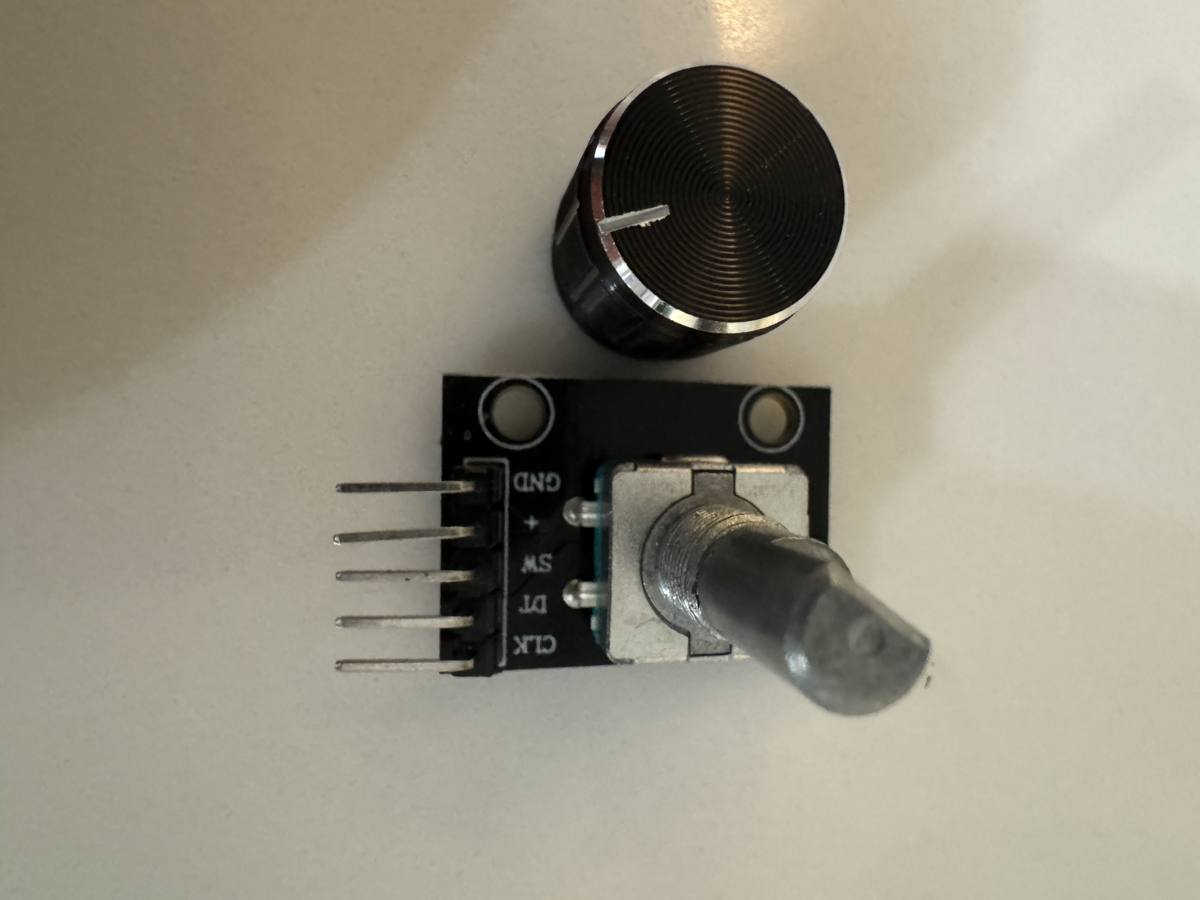
Taiss KY-040 rotary encoder with push button, 5 pack

A clicky knob that turns forever: the board counts clicks and direction, and the knob also pushes like a button.

Taiss KY-040 rotary encoder with push button, 5 pack
Status
in hand: knob separate.
Use it for
  • Menus and volume knobs
  • Setting a timer or a motor speed
  • The G3507's hardware knob-counting input (QEI)
Hook it up
5 pins, as printed top to bottom: GND, + (power), SW (push switch), DT, CLK. Power it from 3.3 V. The knob presses onto the shaft.

Where to buy: Amazon, B07F26CT6B.

Cables, power supplies and antennas

in hand.

Adafruit STEMMA QT / Qwiic cable to female sockets, 150 mm

Plugs any Qwiic sensor onto a LaunchPad kit's header pins with no soldering.

Also
Adafruit 4397.
Use it for
  • Adding Qwiic sensors to any board here
Hook it up
Black GND, red 3.3 V, blue SDA, yellow SCL, onto the LaunchPad kit's I2C header pins.

Where to buy: DigiKey, 1528-4397-ND.

in hand.

Adafruit STEMMA QT / Qwiic cable to male pins, 150 mm

The same cable with pins instead of sockets, for the C1104's socket header or a breadboard.

Also
Adafruit 4209.
Use it for
  • Qwiic sensors on the MSPM0 C1104
  • Qwiic sensors on a breadboard
Hook it up
Same colors as above.

Where to buy: DigiKey, 1528-4209-ND.

in hand.

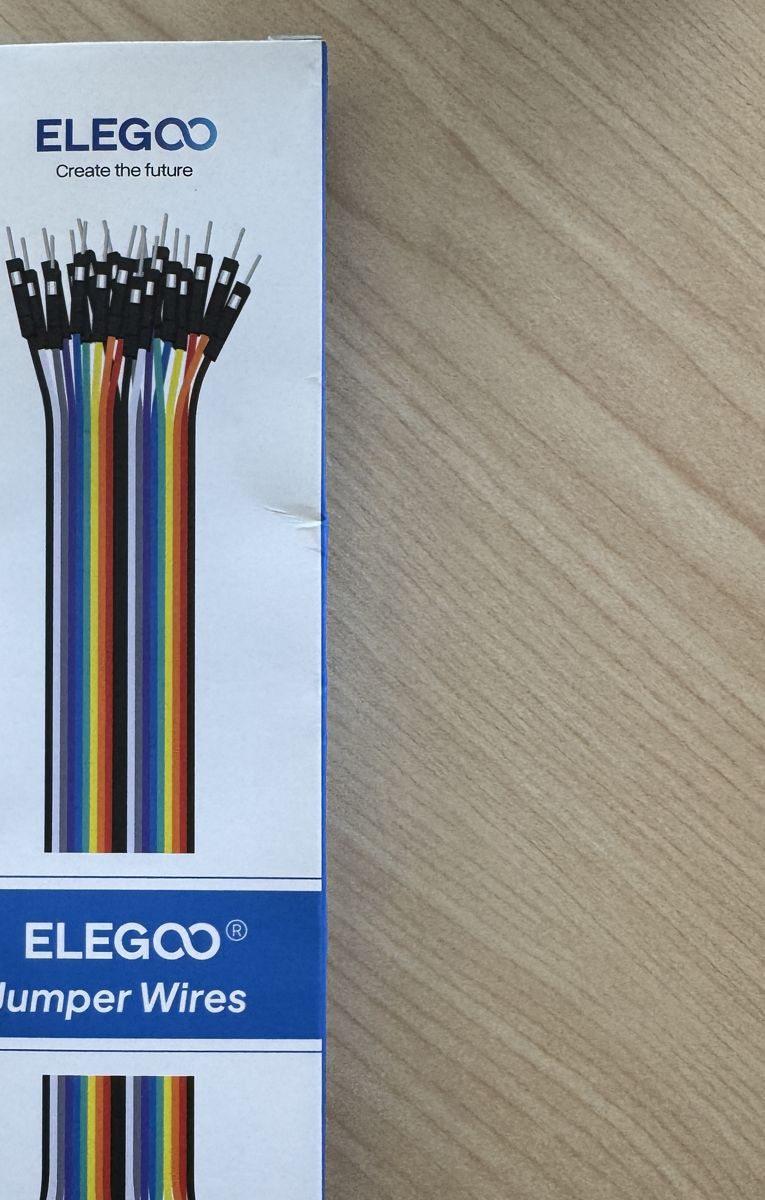
ELEGOO jumper wires

Male and female breadboard wires for connecting anything to anything.

ELEGOO jumper wires (120-piece pack)
to order only if you have no 20 V USB-C charger.

USB-C power supply that gives 20 V at 3 A or more (60 W class), for the SK-TDA4VM

A USB Power Delivery wall charger that can negotiate 20 V.

More
TI's user guide lists two tested models: GlobTek TR9CZ3000USBCG2R6BF2 and Qualtek QADC-65-20-08CB (65 W). A 5 V charger can reset the board during boot.
Use it for
  • Powering the SK-TDA4VM
Hook it up
Charger to the board's USB-C power port J14 (its status LED is LD3). Do not use the USB-C data port J12 for power.

Where to buy: DigiKey (TI's tested part), Qualtek QADC-65-20-08CB.

in hand: one came in the BP-CC1407P-9-FE box (2026-10-08).

915 MHz SMA whip antenna

A tilt-and-swivel whip antenna for 900 to 930 MHz, 1.2 dBi, SMA male plug.

Also
TE / Linx ANT-916-CW-HWR-SMA.
Use it for
  • The BP-CC1407P-9-FE radio, which ships with an SMA socket and no antenna
Hook it up
Screws onto the BoosterPack's SMA socket J7. Fit it before the radio is powered.

Where to buy: authorized distributors (Octopart listing), ANT-916-CW-HWR-SMA.

in hand.

Anker Prime USB-C to USB-C cables, 240 W, 3 ft and 6 ft

Braided USB-C cables rated for 240 W, so any board or charger here gets its full power.

Use it for
  • Powering high-current boards from the 160 W charger
  • Long runs from the charger to the bench
Hook it up
USB-C at both ends.

Where to buy: Anker store.

in hand.

AGVEE USB-C to micro-USB cables, 3.3 ft, 2 pack

Cables for the many LaunchPad development kits that still use micro-USB, straight from a USB-C laptop or hub.

Use it for
  • Connecting micro-USB boards to a USB-C-only computer without an adapter
Hook it up
USB-C to the computer or hub, micro-USB to the board.

Where to buy: Amazon, ASIN B0DJY122Z7.

in hand.

Syntech USB-C to USB-A adapters, 2 pack

Adapters that let a USB-A cable or device plug into a USB-C port.

Use it for
  • Using the USB-A cable that came in a board's box on a USB-C laptop
Hook it up
USB-C side into the computer or hub.

Where to buy: Amazon, ASIN B07CVX3516.

in hand.

Duracell CR2032 lithium coin cell, 3 V (4 pack)

A 3 V coin cell, about 225 mAh, for a board that wakes once a minute.

Use it for
  • The L1306 once-a-minute clock on a coin cell (the battery-life project)
  • Bluetooth beacons and BTHome sensors running off the USB cable
Hook it up
A CR2032 holder wired to the board's 3V3 and GND pins, with the USB power jumper removed so the probe does not back-feed it.

Where to buy: MacKay Hardware and Rental (Ace), SKU 3414794.

in hand.

Insulated alligator clips, 2 in (2 pack)

Clips for a quick probe ground, a test lead on a pin, or holding a wire during a measurement.

Use it for
  • Scope or meter ground on a board
  • Hold the thermocouple lead while it is taped down
Hook it up
Clip onto a test point or a header pin; never across two adjacent pins.

Where to buy: MacKay Hardware and Rental (Ace), SKU 3011970.

Bench gear: hubs, power, cameras

in hand.

RSHTECH 10-port powered USB-C 3.2 hub (RSH-H10C)

A powered hub with ten USB ports on its own supply, so a row of boards draws power from the wall instead of the laptop.

Use it for
  • Keeping six to ten boards and probes plugged in at once
  • Stable power for boards that brown out on a laptop port
  • Leaving boards connected between sessions
Hook it up
Its own power adapter, one USB-C cable to the computer. Each board's debug USB goes into a port.

Where to buy: Amazon, ASIN B0H2P2SW6Q.

in hand.

Acer 10 Gbps USB-C hub, 4 USB-C ports plus 100 W pass-through

A small unpowered hub that splits one USB-C port into four, with a charging input so the laptop keeps its power.

Use it for
  • A second set of USB-C ports beside the powered hub
  • Charging the laptop through the hub while boards stay connected
Hook it up
One USB-C cable to the computer; a USB-C charger into the power-delivery port.

Where to buy: Amazon, ASIN B0F5HSNDXF.

in hand.

Anker Prime charger, 160 W, 3 ports, with display

A three-port USB-C charger that shows the power each port is delivering on a small screen.

Use it for
  • Powering a hungry board such as the SK-TDA4VM (20 V at 3 A) from one brick
  • Reading a board's power draw at a glance
Hook it up
USB-C to the board's power input. Check that the board takes USB-C power delivery and what voltage it asks for.

Where to buy: Anker store, WSPDV2HZNOFF.

in hand.

Anker Nano charger, 45 W, with display

A small single-port USB-C charger with a power readout.

Use it for
  • Powering one board away from the computer
  • A second power source for a two-board demo
Hook it up
USB-C to the board.

Where to buy: Anker store, WS24CNCZYG9B.

in hand.

TESSAN tower power strip with surge protection, 10 ft flat cord

A vertical power strip that takes the hub supply and the chargers in one place.

Use it for
  • One switched power source for the whole bench
Hook it up
Wall outlet; the hub supply and chargers plug into it.

Where to buy: Amazon.

in hand.

Logitech USB webcam

A plain USB webcam that works with no driver.

Also
C310 class, 720p.
More
Placed close to one board it reads small displays and LED colors.
Use it for
  • A close-up of one board
  • A camera that needs no network or account
Hook it up
USB-A into the computer or hub.
in hand.

12 V DC power supply, 0.5 A or more

Motor power for the brushless motor bench: the DRV8376EVM takes 4.5 to 65 V DC on two screw terminals and is reverse-polarity protected.

Status
in hand: model not recorded.
Also
any wall adapter; model not recorded.
More
The bench used a 12 V, 0.5 A adapter, read at 12.4 V on the board with the motor unloaded; it never sagged.
Use it for
  • Motor power for the DRV8376EVM with the BLY171S motor, unloaded
Hook it up
Positive to VBAT, negative to PGND on the DRV8376EVM screw terminals. An adapter with a barrel plug needs the plug cut off or a barrel-to-screw-terminal adapter; the bench notes do not say which was used.

Where to buy: any.

on order.

DeWalt 20V MAX battery adapter with switch and inline fuse

A dock for DeWalt 20V MAX packs with a power switch, an inline blade fuse holder and two leads.

Status
on order: arrival not confirmed.
More
The pack is five Li-ion cells: 18 V nominal, about 20 V full, about 15 V empty. Ships with a 30 A fuse; swapped for 10 A before first use. (treat 15 V as the floor)
Use it for
  • Battery power for the motor bench, replacing the 12 V adapter
  • The power-tool story: a real cordless pack driving a Hall motor
Hook it up
Red lead to the driver's VM (motor supply) terminal, black to PGND, switch off, 10 A fuse fitted. Nothing switched on until the firmware for battery power is flashed. Never short the leads, never leave a pack connected unattended.

Where to buy: Amazon, B0B63LPYN5.

in hand.

Clamp lamp, 6 ft cord, with a 60 W-equivalent LED bulb (two)

Bench lighting: even light over the boards for photographs.

Use it for
  • Straight-down board photographs on plain paper
Hook it up
Clamps to the shelf edge; aim from two sides to kill the shadows of the boards and cables.

Where to buy: MacKay Hardware and Rental (Ace), LAMP CLAMP 18/2 SPT-2 6 ft, SKU 31860; LED G25, SKU 3908175.

Smart home radio

in use.

Home Assistant Connect ZBT-2

Home Assistant's own USB radio for Zigbee and Thread, the coordinator for every Zigbee and Thread board test in the house network.

Use it for
  • Joining Zigbee boards to Home Assistant
  • Running a Thread network that Matter devices use
Hook it up
USB into the machine that runs Home Assistant, on an extension cable away from USB 3 ports and Wi-Fi.

Where to buy: Amazon, ASIN B0G34ZTW51; Home Assistant.

in hand.

ThirdReality Smart Plug Gen2

A Zigbee wall plug that switches a lamp or fan and reports its power draw; Home Assistant sees it through ZHA.

Status
in hand: 2026-10-14; already in the house.
Also
Zigbee, power metering.
Use it for
  • Switch a real lamp from a board (voice or radar)
  • Turn a fan on from a CO2 reading
Hook it up
Plugs into the wall; pairs to the Home Assistant Zigbee coordinator (the ZBT-2). No wires to the LaunchPad.

Where to buy: thirdreality.com, Smart Plug Gen2.

in hand ; model, ASIN and price not recorded.

Zigbee smart plug

A mains-powered Zigbee wall plug.

Also
bought on Amazon; model not recorded.
More
It switches a lamp from Home Assistant, and because it stays plugged in it also acts as a Zigbee relay for the network: on this bench every join of the CC1354P10-1 sleepy sensor went through it, because the ZBT-2 coordinator was out of that board's range.
Use it for
  • Switching a real lamp from Home Assistant, to check the coordinator path on its own
  • A mains-powered Zigbee relay that extends the network so a battery-class board can join
Hook it up
Plugs into the wall; pairs to Home Assistant through the ZBT-2 (Settings, Devices and services, Zigbee Home Automation, Add device). No wires to a LaunchPad.

Where to buy: Amazon, model and ASIN not recorded.

in hand ; paired and in Home Assistant through the Feit cloud 2026-10-20.

Feit Electric Smart WiFi Bulb, BR30, color changing, 8 W

A color bulb controlled from a phone app, Google Home and Alexa.

Status
in hand ; paired and in Home Assistant through the Feit cloud 2026-10-20: 20 toggles median 698 ms.
More
The demo light for the smart-home builds: a board turns it on, a sensor changes its color.
Use it for
  • Radar presence turns the light on, empty room turns it off
  • A LaunchPad button or knob sets the color through Home Assistant
  • The same light shown in Google Home, Alexa and Apple Home at once
Hook it up
Screws into a lamp; joins Wi-Fi through the Feit Electric phone app (an account is required; installation guide feit.com/smartwifibulb). No HomeKit code in the box guide. Home Assistant reaches it through a cloud integration or local control; Apple Home through Home Assistant's HomeKit Bridge. No wires to the LaunchPad. Constant power to the socket is required.

Where to buy: MacKay Hardware and Rental (Ace), BULB LED SMRT BR30 CC 8W, SKU 3925617.

Source: the parts list.