Fox Red Labs / Builds / Smart home and radio
A walkie-talkie over a 915 MHz radio
The Mac speaks a line and compresses it to 4-bit ADPCM. The CC1354P10-1 sends it over a 915 MHz radio, the CC1407P on an MSPM0 G5187 receives it, and the Mac plays it back.
HardWiring needed
Parts and steps
You need
- LP-MSPM0G5187 LaunchPad development kit the CC1407P's host
- BP-CC1407P-9-FE sub-1 GHz radio BoosterPack plug-in module the sub-1 GHz radio
- LP-CC1354P10-1 LaunchPad development kit the other radio
- ELEGOO jumper wires x8 radio to the LaunchPad's J20 header
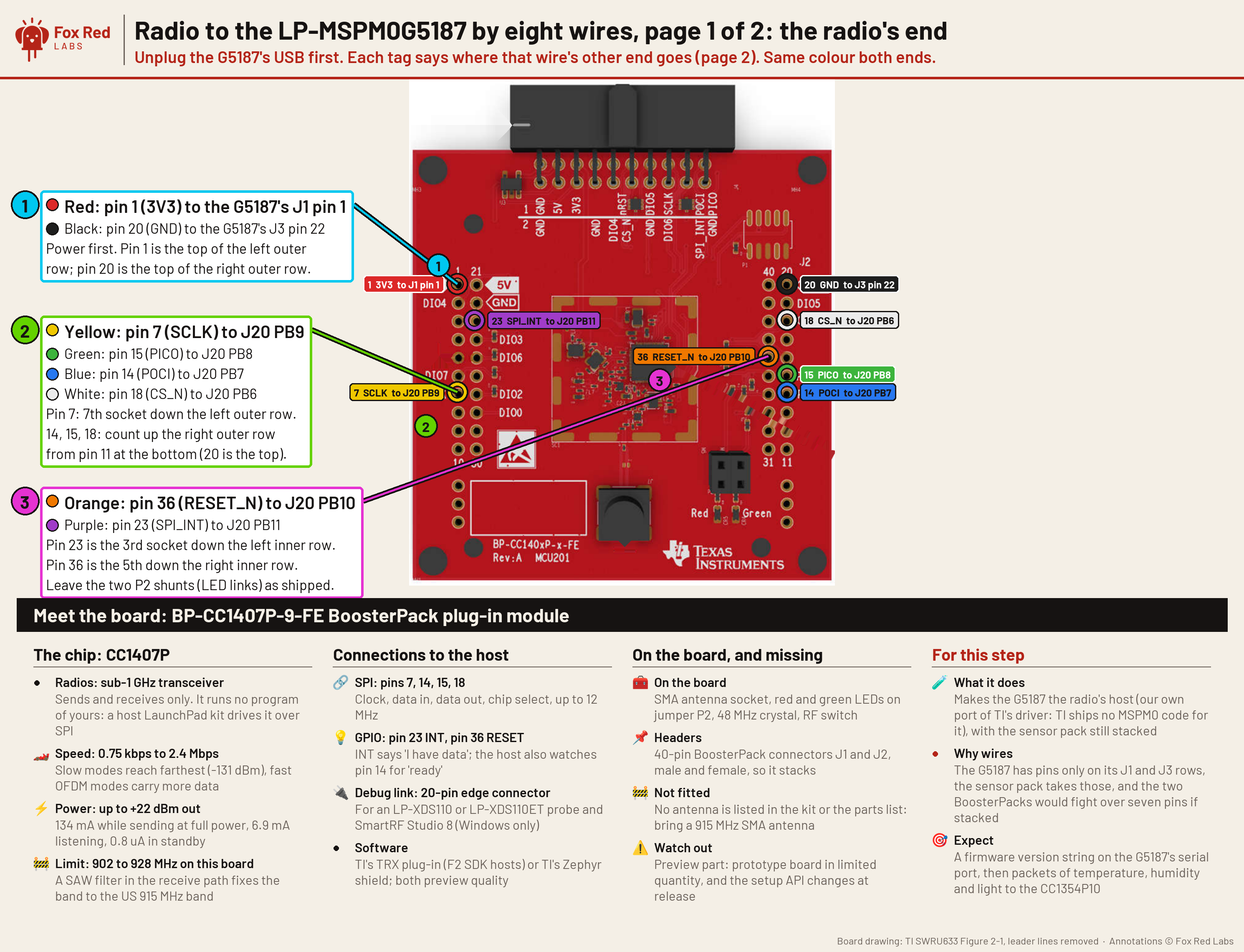
Pin table
| Radio pin | LaunchPad pin | What it is | Needed |
|---|---|---|---|
| Radio pin 1 (3V3) | J1 pin 1 (3V3) | power | required |
| Radio pin 20 (GND) | J3 pin 22 (GND) | ground | required |
| Radio pin 7 (SCLK) | J20 PB9 | SPI clock | required |
| Radio pin 15 (PICO) | J20 PB8 | data into the radio | required |
| Radio pin 14 (POCI) | J20 PB7 | data out of the radio | required |
| Radio pin 18 (CS_N) | J20 PB6 | chip select | required |
| Radio pin 36 (RESET_N) | J20 PB10 | radio reset | required |
| Radio pin 23 (SPI_INT) | J20 PB11 | radio says it has data | required |
Wire the radio to the LaunchPad.BENCH
With USB unplugged, screw the 915 MHz antenna onto the radio board's SMA socket and join the radio to the MSPM0 G5187's J20 header with the eight wires in the table. Plug the other LaunchPad into the Mac.
You should see: Each wire's other end is on the pin in the table.
Build the CC1407P side.TERMINAL
Build
radio_lab, which turns the MSPM0 G5187 into a radio driven by text commands on its serial port.RADIO_APP=radio_lab mspm0g5187/radio/build.shYou should see: The script ends with
image: mspm0g5187/radio/out/radio_lab.out.Build the partner side on the CC1354P10.TERMINAL
Follow the Build section of
cc1354p10/radio-rx/README.mdto get the F2 SDK libraries and therfPacketRxexample, then buildpartner.cas that README describes, with the Wi-SUN FSK mode 2b setting (phyType868,#define RX_ADV).You should see: The build leaves
rfPacketRx.hex, about 29 kB.Flash both boards.TERMINAL
Put each probe's serial in its
.ccxml(xdsdfu -elists them). Flashradio_lab.outto the MSPM0 G5187 andrfPacketRx.hexto the CC1354P10, then start the CC1354P10 withxds110reset.Replace <serial> before you run this.
/Applications/ti/uniflash_9.6.0/dslite.sh --mode flash -c mspm0g5187/MSPM0G5187_<serial>.ccxml -e -f -v mspm0g5187/radio/out/radio_lab.outYou should see: Both boards answer on their serial ports.
Send a voice message.TERMINAL
Set the two serial ports and run the demo. It speaks "Hi Mom! This is Fox Red Labs, talking over a nine hundred fifteen megahertz radio. Over.", sends it in 50 ms frames, receives it and writes both recordings. The result is added to
site/data/radio-demos.json.Replace <G5187 serial> and <partner probe serial> before you run this.
LAB_G=/dev/cu.usbmodem<G5187 serial>1 LAB_P=/dev/cu.usbmodem<partner probe serial>1 python3 mspm0g5187/radio/demos.py voiceYou should see: The run reports 122 frames received.
site/media/radio-demos/voice-sent.wavandvoice-received.wavplay the same message.
Or hand it to a coding assistant
Paste this in a terminal. It hands off to an AI assistant, which says when to plug in each of the two boards.
git clone --depth 1 --filter=blob:none https://github.com/Fox-Red-Labs/fox-red-labs.git && cd fox-red-labs
./start.sh mspm0g5187 walkie-talkies --assistant claudegit clone --depth 1 --filter=blob:none https://github.com/Fox-Red-Labs/fox-red-labs.git && cd fox-red-labs
py start.py mspm0g5187 walkie-talkies --assistant claudeIt runs the steps above and reports what it saw.
Not Claude Code? Copy this prompt instead.
If something goes wrong
| The radio later answers with a checksum error on everything it receives | The inner-row wires (pins 23 and 36) are the usual missing ones. |
| The SDK is not found | Set the paths the script prints. |
| The make cannot find SysConfig | Point SYSCONFIG_TOOL at sysconfig_cli.sh in the 1.28.0 folder, as the README shows. |
DSLite fails with Error -242 | Unplug the board's USB for 3 seconds and flash again. |
| A frame is cut short | The CC1354P10's serial input dropped characters while it was sending; run it again. |
What to build next
Every build. The code for all of them is in the GitHub repository.
Evidence and limitsA spoken message crosses a 915 MHz radio link in 122 of 122 frames and plays back the same except for 40 ms. Ran on 2 boards. Results, sources, timing and limits.
Expected result: The received recording plays the same message as the sent one.
What this shows
- Speech compressed to 32 kbps survives a 100 kbps radio link: 122 of 122 frames arrived with a good checksum.
- A frame takes about 99 ms from computer to computer.
What this does not establish, and limits
What this does not establish
- One way only. Two-way voice needs a speaker amplifier and a second CC1407P, and the board's microphone shares pins with the radio.
- Range was not measured: both boards were on one desk.
Limits to keep in mind
- One frame of 122 reached the radio already cut to 123 of its 205 bytes; the radio's checksum passed, so the air link did not corrupt it.
Sources
Versions, sizes and timing
| Codec and radio | IMA ADPCM, 4 bits, 8 kHz (32 kbps); Wi-SUN FSK mode 2b, 100 kbps, 915 MHz | the data |
|---|---|---|
| Frames | 122 of 50 ms, 205 bytes each; delay median 99.2 ms, maximum 135.0 ms | the data |
Evidence
- On 2026-10-11 a 6.1 second message went over in 122 frames of 50 ms: 122 of 122 with a good checksum, 121 bit-exact against what the Mac sent, a median 99.2 ms and a maximum 135.0 ms from computer to computer. the data
- The received recording matches the sent one sample for sample except 40 ms at 2.36 s, the one frame that reached the radio cut short by the CC1354P10's serial input. the data
Other boards
- MSPM0G3507
- MSPM0L1306, CC2340R5, F2800137Not for this chip no radio
What the status words mean
Works ran here and did what it shouldCould work some of it ran; real porting effort is left; hover for whatNot for this chip the chip or its vendor software cannot; hover for why
Result grid
Works ran here and did what it shouldShould work it builds; only naming, packaging or build glue is in the way; hover for whichCould work some of it ran; real porting effort is left; hover for whatNot for this chip the chip or its vendor software cannot; hover for why
Experiments (1)
| Status | What was tried | Result |
|---|---|---|
| Works | Can one TI radio and an MSPM0 run family demos: walkie-talkie, fox hunt, key finder, smart house? MSPM0 G5187, 2026-10-11 | All five demos work as built. One-way voice passed 122 of 122 frames. Fox hunt heard 64 of 64 beacons, hot to cool. The key finder answered 10 of 10 in 21 ms. The house node sent mailbox, doorbell, panic, kid messages... |
Source files
- Experiment write-up (MSPM0 G5187 and CC1354P10-1): what was tried and where it stopped
Get the code and tell us how it wentThe clone command, the board folder with its AGENTS.md, reports from others, and the three report forms.
Get the code
Clone the repository and open the board's folder below. AGENTS.md is a plain text file of notes for AI coding assistants, and llms.txt at the root indexes the site for one.
git clone https://github.com/Fox-Red-Labs/fox-red-labs.git- LP-MSPM0G5187: folder
mspm0g5187/.- README: the board's lab notebook (what was run, in order)
- Notes for an AI coding assistant working in this repository: notes for an AI assistant; copy it into your own project if you use one
- FAQ: errors and fixes
The other 1 board folder
- LP-CC1354P10-1: folder
cc1354p10/.- README: the board's lab notebook (what was run, in order)
- Notes for an AI coding assistant working in this repository: notes for an AI assistant; copy it into your own project if you use one
- FAQ: errors and fixes
- LP-CC1354P10-1: folder
Code is BSD-3-Clause, writing is CC BY 4.0; third-party folders keep their own licenses.
Built it? Tell us
Built this, or got stuck? Report it on GitHub with a few short answers. Your report shows here in your words, marked as yours. A failure that repeats on the bench gets its fix here.