Hardware / Long range / Step 1 of 1
LP-CC1354P10-1 (CC1354P10)
The CC1354P10 is a wireless microcontroller in TI's CC13xx family: 48 MHz Arm Cortex-M33, 1 MB of flash, 296 kB of RAM, Sub-1 GHz to +20 dBm, Bluetooth LE, Zigbee, Thread.
Quick facts
| Board | LP-CC1354P10-1 |
|---|---|
| Chip | CC1354P10 |
| Core | Cortex-M33 |
| Clock | 48 MHz |
| Flash | 1 MB |
| RAM | 296 kB |
| Radio | Sub-1 GHz to +20 dBm, Bluetooth LE, Zigbee, Thread, Wi-SUN, TI 15.4 |
| Notable peripherals | Two bands: Sub-1 GHz and 2.4 GHz |
| On-board debug probe | Sold separately (LP-XDS110ET at TI.com) |
| Where to buy | TI.com |
| Toolchains that ran | TI compilers, FreeRTOS |
Get it running
First blink: 29 s from plug-in to a changed blink (terminal).
You should see: a blink counter on the serial port that climbs about 9.8 toggles a second. The LED pin itself was not read.
Every step, with the setup: the board's README.
What works
- CoreMark: 199.92 (4.17 per MHz) (TI Arm Clang, bare metal, -O3; 48 MHz; 3 runs)
- Boot to joined network: 1 s (Zigbee network; joining opened in Home Assistant first; 48 MHz)
- Board-to-board radio round trip: 26 ms (48 MHz; 60 runs)
- Radio command to state change, median: 1,574 ms (48 MHz; 20 runs)
- RAM left after linking the radio stack: 238.4 kB (-Oz)
- Interrupt latency, pend to first handler line: 23 cycles (bare metal; 48 MHz; 3 runs)
- GPIO toggle: 1.51 cycles (bare metal, -O3; 48 MHz; 3 runs)
- Blink image size: 11.5 kB of flash, 18.6 kB of RAM (bare metal)
- Room-occupancy AI model, one inference: 2.131 ms (-O2; 48 MHz; 3 runs)
- Control loop, trigger to new PWM value: 21.40 µs (from flash; 48 MHz; 3 runs)
Download every result for this board (CSV), or compare it on this board on the Benchmarks page.
Projects and ports that ran here
- Run a small AI model on the chip: 2.13 ms per answer, fastest build on this chip
- Recognize handwriting with Edge AI: The 99.55% model ran the test digits with 0 failed; about 1.13 million cycles per digit at 48 MHz
- Measure how fast a chip runs: 200 CoreMark score at the board's top clock
- Add a low-power sensor to Home Assistant: 6.0 s to join Home Assistant after boot
- Join a Thread network: Formed its own Thread network and became leader in 6 to 10 s; full device uses 427 kB of flash and 94 kB of RAM
- Send sensor readings between two boards by radio: The receiver: TI's rfPacketRx moved to 915 MHz heard every packet, and a bridge posted four sensors to Home Assistant
- Post-quantum on every board: Both algorithms, and the full key exchange with a Mac over USB serial (the only board where it ran)
- Walkie-talkie over a 915 MHz radio: Sends the message on Wi-SUN FSK mode 2b at 100 kbps, 122 frames of 50 ms
- Sub-1 GHz home radio demos: The other end of every demo: the fox-hunt hunter, the key finder's base and the house node's base
- Post-quantum key exchange and signatures on the LP-CC1354P10-1 Works: ML-KEM-768 key exchange and ML-DSA-44 signatures pass NIST's known-answer vectors on the CC1354P10-1.
- Sub-1 GHz CC1407P radio on an LP-MSPM0G5187, heard by an LP-CC1354P10-1 Works: TI's CC1407P sub-1 GHz radio driver runs unchanged on the MSPM0 G5187, and a CC1354P10-1 receives its packets: 21,658 of 21,658.
- MSPM0 code on the CC2340R5 and CC1354P10 radio chips Could work: MSPM0 driver examples build for the CC2340R5 with a 47-line shim, the first 5 ran with the same pin states as TI's own build, and 4 of 4 ran on the CC1354P10.
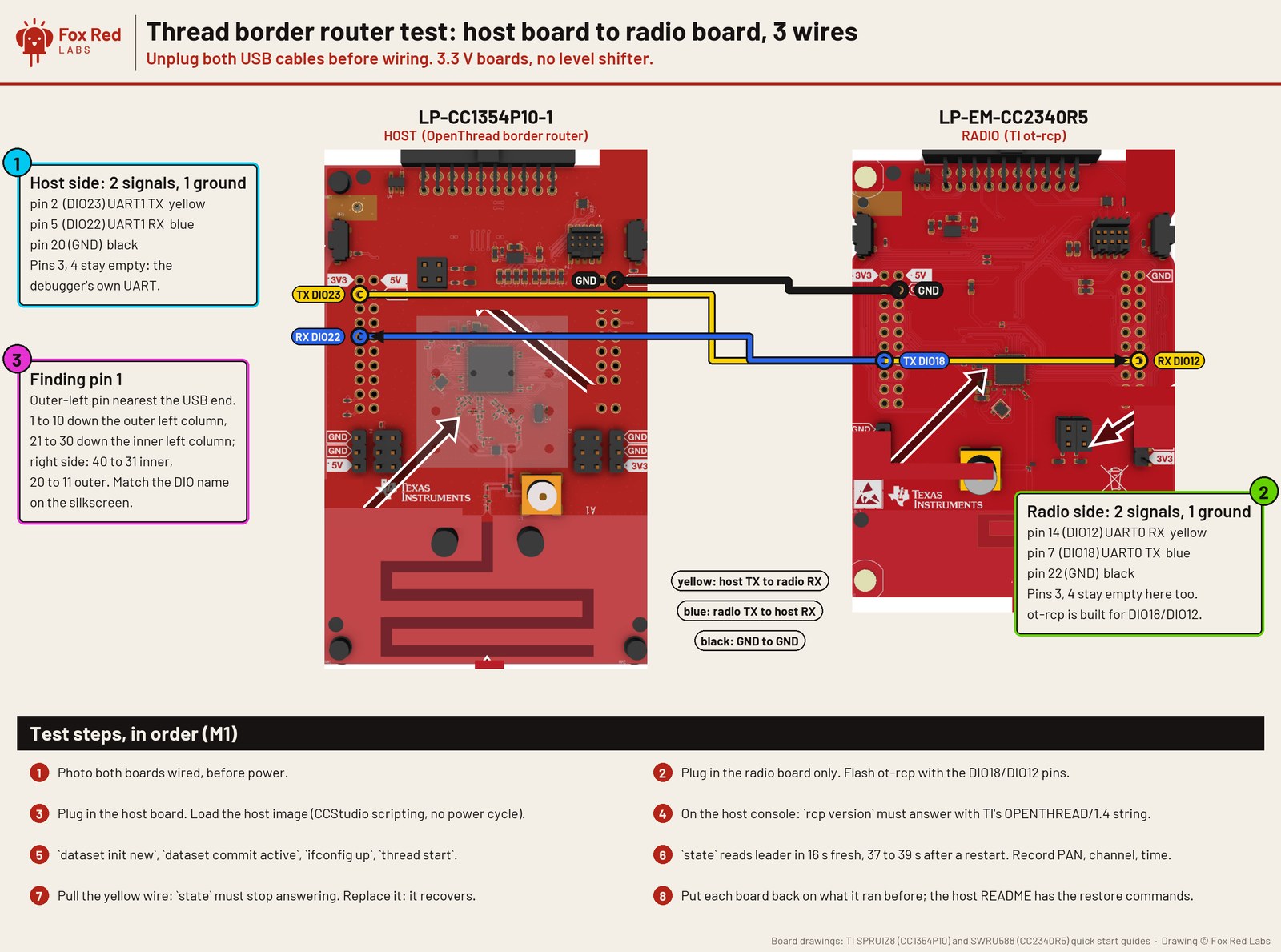
- Wiring demo: Two boards, three wires: a Thread border router host and its radio: The host runs OpenThread with the CC2340R5 as its radio over the wire
Fixes
- If you see
IcePick_C: Error connecting to the target: (Error -261 @ 0x0) Invalid response was received from the XDS110, wait for it to exit, then load again. - If you see
CCS headless build complete - 0 out of 1 projects have errors, but no.out, look for the.outafter every headless build. - If you see
Build-configuration ... does not exist, use the project's own configuration name. - If you see
Compiler version 'TICLANG_3.2.2' is not currently installed - defaulting to 'TICLANG_4.0.4.LTS', ignore it. - If you see
unk_manufacturer unk_modelin Home Assistant, or every read returns0xC1(SOFTWARE_FAILURE), register a read callback withzcl_registerReadWriteCB(...). - If you see
HTTP Error 400: Bad Requestfromzha.issue_zigbee_cluster_commandfor the DMM light, remove the device in Home Assistant, commission again from the board's menu. - If you see
R,rtos,timer_rate,0,FAIL,counter 0 systick 45015, load from the debugger, or time with SysTick. - If you see
timed out waiting for @PK from the boardafterjoin: making an ML-KEM-768 key pair, callTRNG_init()beforeTRNG_open()and check the handle.
For AI assistants
Point your assistant at this board's AGENTS.md (build, flash and fix notes), this board's llms-full.txt (every page for the board in one file) and the repository's llms.txt (the index).
Sources: cc1354p10/README.md, cc1354p10/AGENTS.md, cc1354p10/FAQ.md, data/results/cc1354p10.csv, site/data/portfolio.json, site/data/projects.json, site/data/ports.json.