Fox Red Labs / Builds / Smart home and radio
Switch a board's LED from Home Assistant over Zigbee
Flash TI's on/off light example on a CC2340R5 and switch its LED from Home Assistant. It worked on 2026-10-05; a repeat on 2026-10-16 did not join.
HardNo wiring
Parts and steps
You need
- LP-EM-CC2340R5 LaunchPad development kit Buy the board, with a CC2340R52 chip and 36 kB of RAM. Its red LED is the light
- LP-XDS110ET debugger Buy the debug probe: powers, flashes and carries the serial port
- Home Assistant Connect ZBT-2 Buy the Zigbee coordinator Home Assistant talks through; the only one tested
- USB-C data cable from the probe to your Mac
- A computer or small server that runs Home Assistant with ZHA the controller; free software
- Zigbee smart plug optional, not part of the recorded run: a real lamp to switch from the same Home Assistant.
Set up your computer once: 1 step. Done already? Start at step 2.
Install the tools once, all free.TERMINAL
Get the macOS installer for the SimpleLink Low Power F3 SDK 9.21.00.36 LTS from TI's SDK page (0.55 GB download, 2.0 GB installed). Get CCStudio 21.0.1 from TI's CCStudio download page for TI Arm Clang 5.1.1. Get SysConfig 1.26.3 from TI's SysConfig page (0.96 GB installed). Get UniFlash 9.6.0 from TI's UniFlash page (0.3 GB download, 1.9 GB installed). Install steps, times and disk space are in the repository's
mac-setup/README.md. This repo's scripts point at SysConfig 1.26.3. It came with the SimpleLink Wi-Fi SDK installer on the test Mac, which put it in/Applications/ti/sysconfig_1.26.3. CCStudio 21.0.1 carries its own 1.28.1. This repo's scripts do not point at it.You should see: The SDK folder
simplelink_lowpower_f3_sdk_9_21_00_36_LTSand the folderssysconfig_1.26.3anduniflash_9.6.0are under/Applications/ti.
Clip the probe onto the board, plug the probe's USB-C cable into the Mac, and read the probe's serial number.BENCH
Put that serial number into
cc2340r5/CC2340R5.ccxml, the connection file the flash command uses; it names the probe and the chip with SWD switched on. Do not write that file by hand. If you need a new one, let CCStudio write it; the import command is incc2340r5/README.md, gotcha 2./Applications/ti/ccs2101/ccs/ccs_base/common/uscif/xds110/xdsdfu -e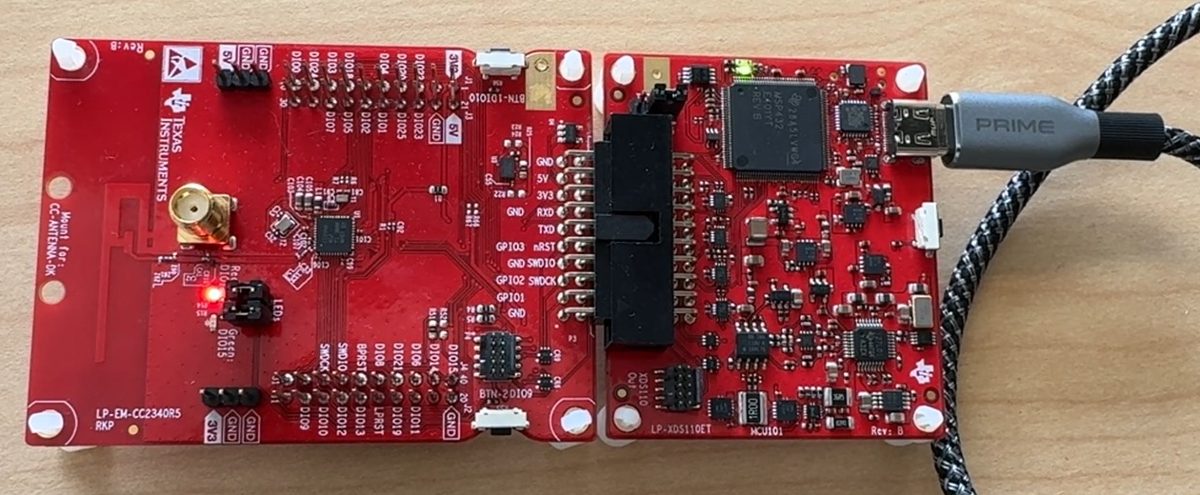
You should see: The probe's serial number is printed.
Open cc2340r5/zigbee/onoff_light/on_off_light.syscfg and check that these two lines are set.EDITOR
They are the whole change to TI's example. The first makes the board a router that joins an existing network. TI ships a coordinator that forms its own network. The second makes it search all 16 channels. TI ships channel 11 only, so a network on any other channel is never found. You can list just your own network's channel instead; Home Assistant shows it in the Zigbee integration's network settings.
zigbee.deviceType = ["zr"]; zigbee.primaryChannels = [11,12,13,14,15,16,17,18,19,20,21,22,23,24,25,26];You should see: The file contains
zigbee.deviceType = ["zr"];andzigbee.primaryChannels = [11,12,13,14,15,16,17,18,19,20,21,22,23,24,25,26];at lines 109 and 110 in this repository's copy.Build the example.TERMINAL
Run the first two commands from
cc2340r5/. The three paths are where TI's installers put the tools on this Mac; change them if yours differ.cd zigbee/onoff_light/freertos/ticlang make -j4 SIMPLELINK_LOWPOWER_F3_SDK_INSTALL_DIR=/Applications/ti/simplelink_lowpower_f3_sdk_9_21_00_36_LTS \ SYSCONFIG_TOOL=/Applications/ti/sysconfig_1.26.3/sysconfig_cli.sh \ TICLANG_ARMCOMPILER=/Applications/ti/ccs2101/ccs/tools/compiler/ti-cgt-armllvm_5.1.1.LTS cd ../../../..You should see: About 30 s of building, then
onoff_light.hexin that folder.Open joining before you flash.BROWSER
In Home Assistant go to Settings, Devices, Add device (ZHA). Or call the
zha.permitservice with a duration of 180.You should see: Home Assistant is searching for Zigbee devices. In the tries the board joined within 37 to 58 s of booting, so flash straight after this.
Flash it, from cc2340r5/.TERMINAL
The
-ein this command prints progress; it does not erase./Applications/ti/uniflash_9.6.0/dslite.sh --mode flash -c CC2340R5.ccxml -e -f -u zigbee/onoff_light/freertos/ticlang/onoff_light.hexYou should see: UniFlash prints
Loading Program: zigbee/onoff_light/freertos/ticlang/onoff_light.hex, thenSetting PC to entry point.andSuccess, about 14 s.Watch the Zigbee device list.BROWSER
Prove the join from here rather than from the board's log.
You should see: A new device named
unk_manufacturer unk_modelappears 37 s after the flash finished, shown as a switch rather than a light. Its address starts00:12:4b, TI's prefix.Turn the new switch on and off from its device page.BROWSER
You should see: The board's LED follows the switch. Over 20 switch commands from a script on the Mac, all 20 landed. Home Assistant showed the new state after a median of 95 ms, with a minimum of 73 and a maximum of 292.
Could work Open joining in Home Assistant first and retry if the board does not join.
Or hand it to a coding assistant
Paste this in a terminal. It hands off to an AI assistant.
git clone --depth 1 --filter=blob:none https://github.com/Fox-Red-Labs/fox-red-labs.git && cd fox-red-labs
./start.sh cc2340r5 zigbee-light --assistant claudegit clone --depth 1 --filter=blob:none https://github.com/Fox-Red-Labs/fox-red-labs.git && cd fox-red-labs
py start.py cc2340r5 zigbee-light --assistant claudeIt runs the steps above and reports what it saw.
Not Claude Code? Copy this prompt instead.
If something goes wrong
| Your tools live somewhere else | The three paths on the make line in step 4 and the dslite.sh path in step 6 are the only places to change. |
A later flash says The target failed to see a correctly formatted SWD header (error -615) | Pull the probe off the board and press it back on, then plug the cable in again. That cleared it on this bench. |
| You start from TI's own copy instead of this repository's copy | Set both lines or the board never appears in Home Assistant and nothing says why. |
| The make step cannot find a tool | Check the three paths. The SDK's own imports.mak points at folders that do not exist, which is why the paths are on the command line. |
| Joining closes before the board arrives | Open it again. |
More troubleshooting
| The connection fails | See the SWD line in step 2. |
| You are starting over on a board that joined before | Remove the device in Home Assistant first. Wait until it is gone from the device list. Re-pairing early left a stale record and the error Failed to send request: device did not respond. |
| The example leaves the manufacturer and model names empty, so Home Assistant fills in those words | It is harmless. |
| Nothing appears in about a minute | The channel is the usual cause: recheck step 3. |
| Latency is one run on one desk | About two hours later, after a re-pairing, the same image answered in 3.5 to 7.0 s, median about 5 s, while the coordinator reported a weaker link. The cause was not found. Measure more than once before you quote a number. |
Every fix for this board: the FAQ.
What to build next
Every build. The code for all of them is in the GitHub repository.
Evidence and limitsJoined Home Assistant and switched in 95 ms on the CC2340R5, 20 of 20; a repeat on 2026-10-16 did not join. Ran on 1 board. Results, sources, timing and limits.
Expected result: On 2026-10-05 the board appeared in Home Assistant about 40 s after the flash as a switch, and the LED followed it. A repeat on 2026-10-16 did not join, so this result is not reproducible today.
What this shows
- TI's Zigbee on/off light example joins a Home Assistant (ZHA) network through a ZBT-2 coordinator on a 36 kB-RAM LaunchPad, with two lines changed in a text file.
- Commands from Home Assistant reach the board and change the LED: 20 of 20 in one run, median 95 ms until Home Assistant showed the new state.
What this does not establish, and limits
What this does not establish
- That a lamp or any other real light was switched. The only light in any run is the board's own LED. A Zigbee plug with a lamp, switched from the same Home Assistant, is not part of the recorded run.
- Range, current draw, packet loss over hours, or a sleeping battery device. The board is a router here and stays awake.
- That other coordinators or Zigbee2MQTT work; only a ZBT-2 with ZHA was tried.
- That the 95 ms is typical. It is one run of 20; the same board answered in about 5 s after a re-pairing two hours later, cause unknown.
Limits to keep in mind
- Not reproducible today: the 2026-10-16 repeat did not join Home Assistant (cause open). Open joining in Home Assistant first and retry if the board does not join.
- RAM is nearly full: 799 bytes free with logging on. Turn
loggingEnabledoff in SysConfig before adding application code. - The serial log is TI's binary format. The decoder
tiloggerfails on a Mac as shipped (unpack requires a buffer of 8 bytes); the one-line fix is in the board FAQ. - Checked on an Intel Mac only.
- The over-the-air update from Home Assistant stalled at about 1% in four tries; cause unknown.
Sources
Why this board
TI's own Zigbee example runs on this chip with two lines changed in a text file. The 36 kB of RAM leaves 799 bytes free, so the demo shows a small radio chip doing a real home job.
Versions, sizes and timing
| Image size | 275.7 kB of flash; 35.2 kB of RAM used, 799 bytes free (logging on), from the linker map of the same source rebuilt later that evening | README notes |
|---|---|---|
| Toolchain | SimpleLink Low Power F3 SDK 9.21.00.36 LTS, TI Arm Clang 5.1.1, SysConfig 1.26.3, UniFlash 9.6.0 (DSLite 21.0.0.4106) | |
| Build and flash time | 30 s build (31 s after the channel fix), 14 to 15 s flash, 37 s from the flash finishing to the device listed in ZHA | README notes |
| Switch latency | 20 of 20 landed; Home Assistant service call median 85 ms; state shown after a median of 95 ms, min 73, max 292 | |
| Link at first pairing | LQI 60, RSSI -85 dBm as the coordinator reported it (weak) | README notes |
| Same board after a re-pairing, two hours later | 30 of 30 landed, median about 5 s (3.5 to 7.0 s); cause unknown, suspected radio environment |
Evidence
- Repeated on 2026-10-16 on the same board, with the image rebuilt byte for byte from this source: it did not appear in Home Assistant's ZHA in three tries (about 4 minutes of open joining each). The board's own log was inconsistent between tries: once it reported a successful join as a router 6.2 s after a reset, once steering cancelled at 6.3 s and no active links left at 16 s. As a control, the Zigbee alarm image on the same board joined the same Home Assistant in 31 s and 7 s. README notes
- Ran on the CC2340R5 on 2026-10-05: the board joined 37 s after the flash finished, and 20 of 20 on/off commands from Home Assistant landed (median 95 ms until Home Assistant showed the new state, min 73, max 292). One run. README notes
- The flash output: the image loaded and the program started (Success).
Other boards
- CC1354P10could work
- MSPM0G3507, MSPM0L1306, F2800137Not for this chip no radio
What the status words mean
Works ran here and did what it shouldCould work some of it ran; real porting effort is left; hover for whatNot for this chip the chip or its vendor software cannot; hover for why
Result grid
Details
the 2026-10-16 repeat did not join Home Assistant in three tries (cause open)Works ran here and did what it shouldShould work it builds; only naming, packaging or build glue is in the way; hover for whichCould work some of it ran; real porting effort is left; hover for whatNot for this chip the chip or its vendor software cannot; hover for why
Source files
- LP-EM-CC2340R5 Zigbee notes (CC2340R5)
Get the code and tell us how it wentThe clone command, the board folder with its AGENTS.md, reports from others, and the three report forms.
Get the code
Clone the repository and open the board's folder below. AGENTS.md is a plain text file of notes for AI coding assistants, and llms.txt at the root indexes the site for one.
git clone https://github.com/Fox-Red-Labs/fox-red-labs.git- LP-EM-CC2340R5: folder
cc2340r5/.- README: the board's lab notebook (what was run, in order)
- Notes for an AI coding assistant working in this repository: notes for an AI assistant; copy it into your own project if you use one
- FAQ: errors and fixes
Code is BSD-3-Clause, writing is CC BY 4.0; third-party folders keep their own licenses.
Built it? Tell us
Built this, or got stuck? Report it on GitHub with a few short answers. Your report shows here in your words, marked as yours. A failure that repeats on the bench gets its fix here.