Hardware / Bluetooth, Zigbee and Thread / Step 1 of 2
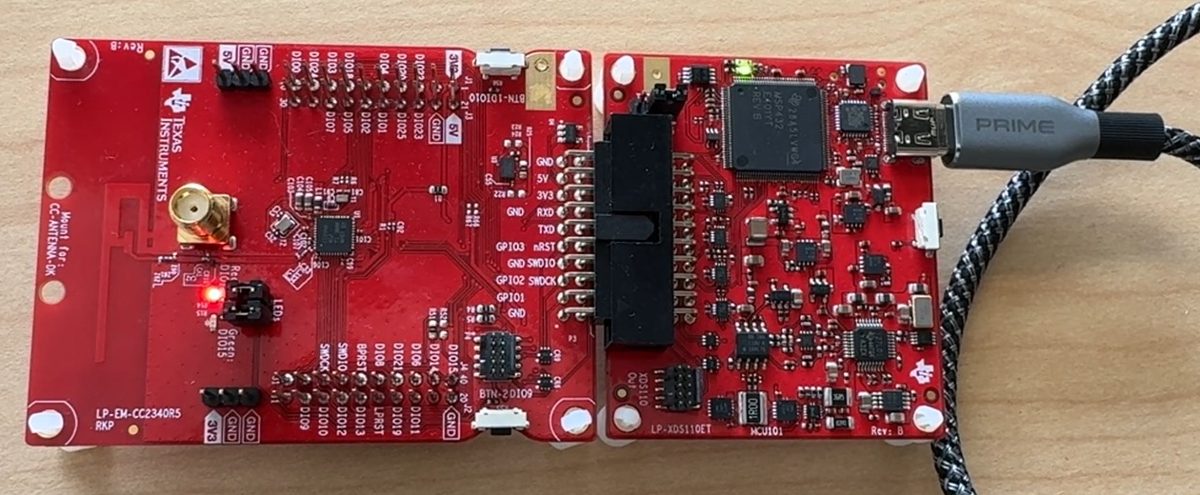
LP-EM-CC2340R5 (CC2340R52)
The CC2340R52 is a wireless microcontroller in TI's CC23xx family: 48 MHz Arm Cortex-M0+, 512 kB of flash, 36 kB of RAM, BLE 5.x, Zigbee, Thread, IEEE 802.15.4 PHY/MAC.
Quick facts
| Board | LP-EM-CC2340R5 |
|---|---|
| Chip | CC2340R52 |
| Core | Cortex-M0+ |
| Clock | 48 MHz |
| Flash | 512 kB |
| RAM | 36 kB |
| Radio | BLE 5.x (qualified against Core 5.4), Zigbee, Thread, IEEE 802.15.4 PHY/MAC, proprietary 2.4 GHz |
| Notable peripherals | AES-128 accelerator; random number generator; 12-bit ADC 1.2 Msps (ext ref), up to 12 inputs; 1 comparator; OTA upgrade supported; max TX +8 dBm |
| On-board debug probe | Sold separately (LP-XDS110ET at TI.com) |
| Zephyr board name | lp_em_cc2340r5 |
| Where to buy | DigiKey |
| Toolchains that ran | TI compilers, GCC, Zephyr, FreeRTOS, Arduino, ESPHome, MicroPython |
Get it running
First blink: 1 min 22 s from plug-in to a changed blink (Zephyr).
Clip the LP-XDS110ET probe onto the board and plug the probe's USB cable into your computer.
In Chrome or Edge, open the browser bench and click Connect.
Pick Bluetooth light: set its colors from this page, no cable and click Flash. The page writes it to the board.
You should see: The LEDs change a moment after you tap a color or a pattern.
The board needs the light program on it once: the button below puts it there.
Build it.
make SIMPLELINK_LOWPOWER_F3_SDK_INSTALL_DIR=<SDK> SYSCONFIG_TOOL=/Applications/ti/sysconfig_1.26.3/sysconfig_cli.sh TICLANG_ARMCOMPILER=/Applications/ti/ccs2101/ccs/tools/compiler/ti-cgt-armllvm_5.1.1.LTSFlash the .hex with UniFlash. Leave out -v and any chip erase.
/Applications/ti/uniflash_9.6.0/dslite.sh --mode flash -c CC2340R5.ccxml -e -f -u src/freertos/ticlang/empty.hex
Replace the parts in angle brackets. Run it from the terminal in VS Code, CCStudio or any IDE.
You should see: the red LED (DIO14) toggles once a second. Line 57 of src/empty.c sets the seconds per toggle.
What works
- CoreMark: 111.09 (2.31 per MHz) (TI Arm Clang, bare metal, -O3; 48 MHz)
- Flash to Bluetooth advertising: 0.17 s (advertising interval 100 ms; scan started in the same Python; 3 runs)
- Bluetooth connect and discover services: 0.55 s (Mac as central through bleak; connect and discover services)
- Boot to joined network: 6 s (FreeRTOS, -Oz)
- Board-to-board radio round trip: 44 ms (boards 30 cm apart; RSSI -30 dBm both ways; channel 15; 10 runs)
- Radio command to state change, median: 95 ms (first pairing; ZHA with ZBT-2 on Mac mini; LQI 60 RSSI -85 dBm)
- RAM left after linking the radio stack: 22.4 kB
- Interrupt latency, pend to first handler line: 28 cycles (bare metal; 48 MHz)
- GPIO toggle: 2.1 cycles (bare metal, -O3; 48 MHz)
- Blink image size: 5.6 kB of flash, 9.9 kB of RAM (bare metal)
Download every result for this board (CSV), or compare it on this board on the Benchmarks page.
Projects and ports that ran here
- Blink an LED: 82 s Zephyr blink, first command to running
- Run a small AI model on the chip: 7.0 to 229 ms per answer, fastest build on this chip
- Measure how fast a chip runs: 111.1 CoreMark score at the board's top clock
- Measure how fast a chip reacts: 28 to 29 cycles from interrupt to first instruction
- Build and flash from the terminal: 22 s TI examples built
- Print a message from the board on your computer: Speed-test report arrives over the probe's serial port
- Run FreeRTOS on a LaunchPad: TI's examples run on FreeRTOS by default; the empty project uses 13 kB of RAM
- Run Arduino's own sketches on a TI chip: Blink and AnalogReadSerial run unchanged through the Zephyr-based Arduino core; attachInterrupt, analogWrite, SPI and Wire also run
- Program a TI chip in Python (MicroPython): Prompt at 115200 baud; Pin, ADC, Pin.irq (10 of 10 edges), PWM, SPI and I2C calls run
- Configure a TI radio chip with ESPHome: Zigbee end device joins Home Assistant (ZHA) 7 to 19 s after esphome upload; 93 of 100 commands over five runs, 20 of 20 in the last
- Asset tracking over Bluetooth: The tag: 283 of 283 run events reached the hub, median 1.4 s, totals identical to the equipment's
- Make a Bluetooth game controller from a LaunchPad: Both buttons reached a Mac as game-controller input: 15 of 15 button changes received, none missed
- Arduino sketches on the LP-EM-CC2340R5 and LP-MSPM0G3519 through the Zephyr-based core: Blink and AnalogReadSerial Works: Arduino's stock Blink and AnalogReadSerial run unchanged on the CC2340R5 and MSPM0 G3519 through the Zephyr-based core.
- ESP32-BLE-Gamepad (a Bluetooth HID gamepad library) on TI, ST and C2000 boards Works: The ESP32-BLE-Gamepad descriptor and reports match the library's output byte for byte on four boards, and 15 of 15 button changes from the CC2340R5 reached a Mac as gamepad reports.
- ESPHome Zigbee device on the LP-EM-CC2340R5 Works: The same YAML with cc23xx: runs a Zigbee end device on the CC2340R5.
- MicroPython 1.29.0 on the LP-EM-CC2340R5 through upstream's Zephyr port Works: MicroPython's own Zephyr port runs on the 36 kB CC2340R5: a >>> prompt, with Pin, ADC, PWM, SPI and I2C from Python.
- Nordic's nRF Blinky and UART services on the LP-EM-CC2340R5 Works: TI's basic_ble with two 8-line service descriptions shows Nordic's LED Button and UART services to a Mac on the CC2340R5.
- OpenOCD flash driver for the LP-EM-CC2340R5 and LP-EM-CC2755P10 Works: OpenOCD erases, writes, verifies and restarts a blink on the CC2340R5 over the XDS110, with no CCStudio or UniFlash.
- Zigbee smoke and CO alarm on the LP-EM-CC2340R5 Works: A Zigbee smoke and CO alarm joins Home Assistant as one device on the CC2340R5, with no custom Home Assistant code.
- Bluetooth media remote (HID) on the LP-EM-CC2340R5 Could work: A hand-written HID service on TI's basic_ble builds for the CC2340R5, and a Mac sees it as a keyboard-class device and starts pairing.
- MSPM0 code on the CC2340R5 and CC1354P10 radio chips Could work: MSPM0 driver examples build for the CC2340R5 with a 47-line shim, the first 5 ran with the same pin states as TI's own build, and 4 of 4 ran on the CC1354P10.
- Wiring demo: Two boards, three wires: a Thread border router host and its radio: The host runs OpenThread with the CC2340R5 as its radio over the wire
Fixes
- If you see
Unable to access the DAP, let CCStudio write the.ccxml(README gotcha 2) and add your probe serial. - If you see
Failed: Connect failedfromcc23xx-unlock-debug-access, pull the probe off, press it on firmly, replug USB, then flash instead of unlocking. - If you see Zigbee example never joins, nothing printed, in the
.syscfgsetzigbee.primaryChannels = [11,12,13,14,15,16,17,18,19,20,21,22,23,24,25,26];andzigbee.deviceType = ["zr"];. - If you see Zigbee serial output is unreadable symbols, decode with
tilogger; changestruct.unpack("L", ts_format)tostruct.unpack("<I", ts_format)on line 132 ofuart_to_log.py. - If you see
Region Base (0xE6000) is outside the device's usable flash [0x0, 0x80000), set the storage addresses to 0x7C000 and 0x79000. - If you see ld.bfd: region `RAM' overflowed by 346 bytes, use
CONFIG_COMMON_LIBC_MALLOC_ARENA_SIZE=1024. - If you see
section .nvs VMA [0000000000010000,0000000000013fff] overlaps section .text, applycc2340r5/thread/ot-ti-local.patch(settings at 0x7C000). - If you see
error #10264: NVRAM memory range overlaps existing memory range FLASH, usecc2340r5/matrix/dmm_r53_linker.cmd.
How long an AI assistant took here
8 jobs timed with an AI coding assistant on this board, given the board's notes. Time is the median of the runs; passed means a person or a script checked the result. No spend or token counts here.
| Job | Assistant | Notes given | Time | Passed |
|---|---|---|---|---|
| ble advertise | Sonnet 5.5 | with the board's notes | 3.7 min | 1 of 1 |
| coremark | Sonnet 5.5 | with the board's notes | 2.3 min | 1 of 1 |
| port gamepad build only | Sonnet 5.5 | with the board's notes | 7.3 min | not checked |
| thread question | Sonnet 5.5 | with the board's notes | 0.3 min | 1 of 1 |
| zephyr blink | Fable 5.1 | with the board's notes | 3.0 min | 1 of 1 |
| zephyr blink | Haiku 4.5 | with the board's notes | 3.6 min | 1 of 1 |
| zephyr blink | Opus 5.5 | with the board's notes | 3.0 min | 1 of 1 |
| zephyr blink | Sonnet 5.5 | with the board's notes | 3.1 min | 1 of 1 |
For AI assistants
Point your assistant at this board's AGENTS.md (build, flash and fix notes), this board's llms-full.txt (every page for the board in one file) and the repository's llms.txt (the index).
Sources: cc2340r5/README.md, cc2340r5/AGENTS.md, cc2340r5/FAQ.md, data/results/cc2340r5.csv, site/data/portfolio.json, site/data/projects.json, site/data/ports.json.