Fox Red Labs / Builds / Smart home and radio
Read a machine's run events on a phone, no internet
Bluetooth tags on your machines, a Wi-Fi hub and a phone. Read run events, trips and run time with no internet. Built on a CC2340R5 tag and a CC35X1 hub.
HardNo wiringan afternoon with two boards
Parts and steps
You need
- LP-EM-CC2340R5 LaunchPad development kit 1 per machine Buy the tag: reads the machine's lines and advertises them over Bluetooth
- LP-EM-CC35X1 LaunchPad development kit the hub: Wi-Fi access point and Bluetooth scanner
- LP-XDS110ET debugger x2 Buy one debug probe for the tag and one for the hub (the README also allows an LP-XDS110 for the tag)
- A phone with a browser joins the hub's Wi-Fi and shows the app
- A Mac or Linux computer builds, flashes and runs the home base program
- Two jumper wires (only to connect a real motor controller) x2 the controller's TX to the tag's RX, and ground; not needed with the buttons or the simulator
- LP-AM13E230 LaunchPad development kit optional a real motor controller with the telemetry firmware; built, not run on a spinning motor
Check the data formats and the on-tag model.TERMINAL
No hardware needed.
python3 tool-telemetry/proto/test_proto.py python3 tool-telemetry/ai/train.py python3 tool-telemetry/ai/test_model.pyYou should see:
OK: 9014 checks, C and Python codecs agree, the two trees' scores, thenOK: C model matches the Python trees.Build and flash the tag (CC2340R5 on its probe).TERMINAL
The flash erases the chip, so save what is on it first.
tool-telemetry/tag/build.sh tool-telemetry/tag/flash.shYou should see:
@TAG boot name=Tag XXXX ... ext=0.ext=0means extended advertising started.Build and flash the hub (CC35X1 on its LP-XDS110ET).TERMINAL
The first build makes a random Wi-Fi password and saves it in a secrets file outside the repository. The build prints the file name.
tool-telemetry/gateway/build.sh tool-telemetry/gateway/flash.shYou should see:
[ttgw] AP FRL-HUB-XXXX up, address 10.0.0.3and[ttgw] scanning (rc=0).Make run events.BENCH
Hold the tag's left button to run the machine, or press the right button for a jam. Or play a machine from the computer, giving the tag probe's port. On the phone, join Wi-Fi
FRL-HUB-XXXXwith the password from step 3 and openhttp://10.0.0.3.Replace <tag probe> before you run this.
python3 tool-telemetry/sim/toolsim.py /dev/cu.usbmodem<tag probe>1 --minutes 5 --speed 3You should see: The Tools tab lists the machine within seconds. Tap it for its load mix. Leave the hub's Wi-Fi and the Saved tab keeps everything.
Open the web dashboard in demo mode.BROWSER
Open the web dashboard on your computer: one file, no install, no internet. With no hub in reach it replays three bench runs (
tool-telemetry/results/e2e-7,e2e-5ande2e-zephyr) at 10 times speed for about a minute. Press Replay to rerun, or drag the slider to 7:00 for the moment in the picture. Click a tag to filter its events.open tool-telemetry/web/dashboard.html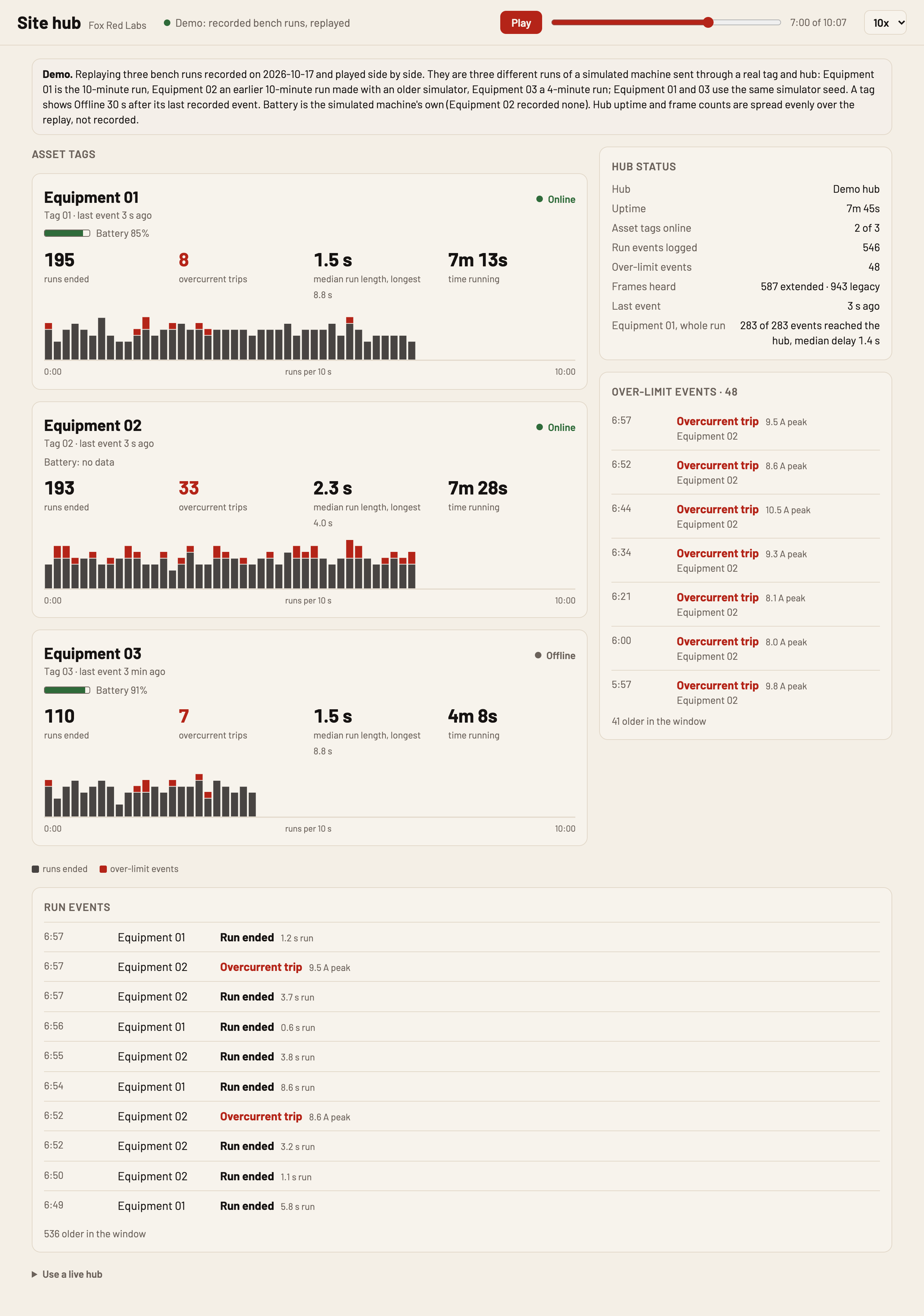
You should see: Three asset tags with battery, last event, runs ended, overcurrent trips and a run timeline (over-limit events in red), plus hub status and the latest events, as in the picture. Equipment 03, a shorter run, goes Offline 30 s after its last event. The other two stay Online.
Point the dashboard at the hub.BROWSER
Put the computer on the hub's Wi-Fi (or the site network the hub joined). In Use a live hub at the page bottom, type the hub's address (10.0.0.3 on its own Wi-Fi) and press Connect. The page polls
/api/info,/api/tagsand/api/logevery 2 seconds. It has run only against a stand-in serving a recorded hub's answers. In a narrow window it stacks into one column, as in the picture.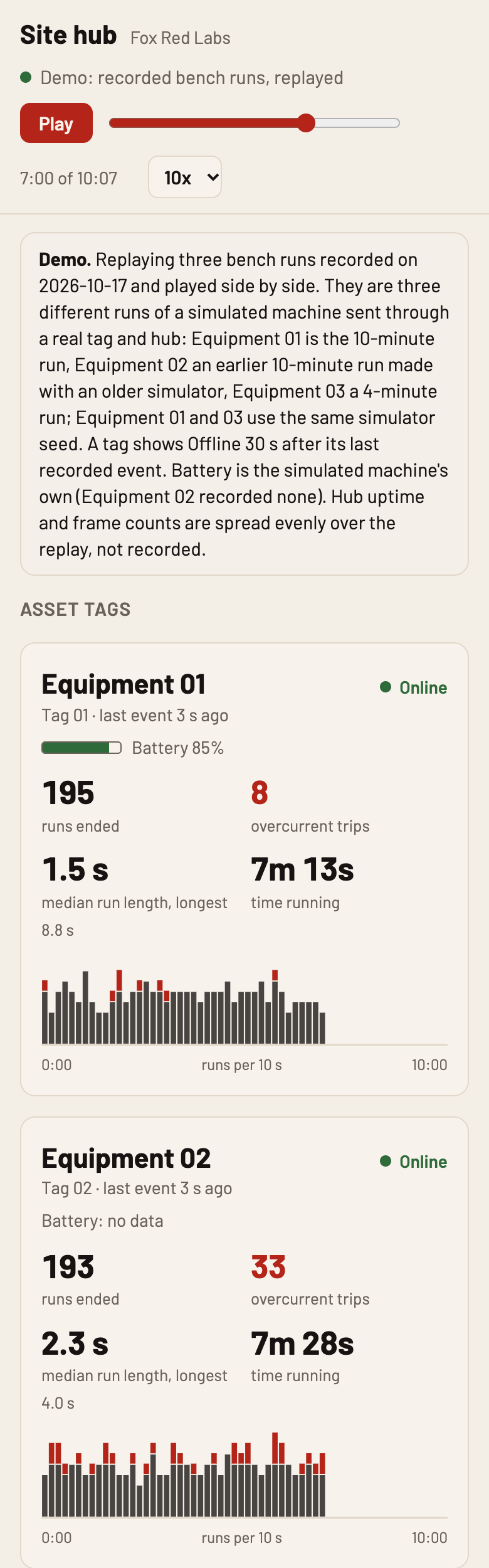
You should see: Not seen on a running hub: Connected to FRL-HUB-XXXX and the asset tags from step 4 with live counts. The picture shows the narrow layout with demo data.
Send it home.TERMINAL
Start the home base on the computer with a word as a token. On the phone's Saved tab enter the computer's address and the token, press Upload, then open
http://localhost:8090.Replace <a word you choose> before you run this.
python3 tool-telemetry/homebase/server.py --host 0.0.0.0 --token <a word you choose>You should see: The fleet page fills with the uploaded records.
Make the dataset and retrain the model on what you collected.TERMINAL
Replace <work folder> before you run this.
python3 tool-telemetry/ai/dataset.py python3 tool-telemetry/ai/train.py --from-gold <work folder>/dataset/gold/pulls.csvYou should see: The retrained model lands in
tool-telemetry/ai/out-collected/. The shipped model stays.
Or hand it to a coding assistant
Paste this in a terminal. It hands off to an AI assistant, which says when to plug in each of the two boards.
git clone --depth 1 --filter=blob:none https://github.com/Fox-Red-Labs/fox-red-labs.git && cd fox-red-labs
./start.sh cc2340r5 tool-telemetry --assistant claudegit clone --depth 1 --filter=blob:none https://github.com/Fox-Red-Labs/fox-red-labs.git && cd fox-red-labs
py start.py cc2340r5 tool-telemetry --assistant claudeIt runs the steps above and reports what it saw.
Not Claude Code? Copy this prompt instead.
If something goes wrong
| At step 1 | A missing script means you are not in the repository root. |
| The flash cannot connect | Pull the probe off the board and press it back on. |
The console stops before http listening | Press reset once. |
| The phone cannot reach the hub | The page may still be asking the site address. The app falls back to 10.0.0.3 (not rechecked on a phone). |
No open? Double-click the file, or type file:// and its full path into a browser | No web server needed. |
More troubleshooting
It says No hub answered at 10.0.0.3. Is this computer on the hub's Wi-Fi? | The computer is on another network, or the page came from an https address, which a browser will not let call an http hub. |
Without --token, anyone on your network could upload | Keep it. |
| At step 8 | Needs at least one upload from step 7. |
Every fix for this board: the FAQ.
What to build next
Every build. The code for all of them is in the GitHub repository.
Evidence and limitsA CC2340R5 tag and a CC35X1 hub carried 283 of 283 run events to a phone app, median 1.4 s, no internet. Ran on 2 boards. Results, sources, timing and limits.
Expected result: Within seconds the phone lists the machine and counts its run events, trips and run time, and keeps them offline.
What this shows
- A motor controller's run events reach a phone through a Bluetooth tag and a Wi-Fi hub: 283 of 283 in one simulated run, median 1.4 s.
- Once loaded from the hub, the phone app needs no internet. The home base keeps each record once, even when two paths deliver it.
- A one-file web dashboard shows the same data on a computer, with a timeline, and replays recorded runs with no hardware.
What this does not establish, and limits
What this does not establish
- That it works on a real running motor. The AM13E230 firmware is built and answers commands, but no motor has spun under it.
- That the on-tag model is right on real machines. It scored 95.9% against a simulator's own labels.
- Range, battery life or more than two tags.
- That live mode works on the running hub. It ran only against a stand-in, because the hub was not on this network. In the demo, the three tags are three different recorded runs, and hub uptime and frame counts are spread over the replay, not recorded.
Limits to keep in mind
- Data on the air is not encrypted. The hub's log lives in RAM. Bench builds leave the hub's model and command endpoints open (
SECURE=1closes them). - The CC2340R5 has about 200 bytes of RAM left with models, commands and leases in.
- Checked on one Intel Mac only.
Sources
Why this board
The CC2340R5 is the cheapest Bluetooth board here. The CC35X1 has Wi-Fi and Bluetooth.
Versions, sizes and timing
| Events reaching the hub | 283 of 283; median 1.4 s, 95% within 5.0 s | README notes |
|---|---|---|
| Lines from machine to tag | 1,264 sent, 1,264 good, 0 bad | README notes |
Evidence
- On 2026-10-17 the tag and the hub, about 1 m apart, carried 283 of 283 run events from a simulated machine to the hub's log: median 1.4 s, 95% within 5.0 s, hub totals identical to the machine's. 10 minutes a run, 3 times real speed. README notes
Other boards
- AM13E230Could work ran in part
- MSPM0G3507, MSPM0L1306, F2800137
What the status words mean
Works ran here and did what it shouldCould work some of it ran; real porting effort is left; hover for whatNot for this chip the chip or its vendor software cannot; hover for why
Result grid
Works ran here and did what it shouldShould work it builds; only naming, packaging or build glue is in the way; hover for whichCould work some of it ran; real porting effort is left; hover for whatNot for this chip the chip or its vendor software cannot; hover for why
Experiments (1)
| Status | What was tried | Result |
|---|---|---|
| Works | Can a CC2340R5 Bluetooth tag carry a machine's telemetry to a CC35X1 hub, and a phone, with no internet? CC2340R5, 2026-10-17 | A CC2340R5 tag fed by a machine MCU's UART advertised its counters on a legacy set and its full record on an extended set at the same time, and a CC35X1 hub with its own access point and the house Wi-Fi up logged 283... |
Source files
- README (CC2340R5): setup and build steps
Get the code and tell us how it wentThe clone command, the board folder with its AGENTS.md, reports from others, and the three report forms.
Get the code
Clone the repository and open the board's folder below. AGENTS.md is a plain text file of notes for AI coding assistants, and llms.txt at the root indexes the site for one.
git clone https://github.com/Fox-Red-Labs/fox-red-labs.git- LP-EM-CC2340R5: folder
cc2340r5/.- README: the board's lab notebook (what was run, in order)
- Notes for an AI coding assistant working in this repository: notes for an AI assistant; copy it into your own project if you use one
- FAQ: errors and fixes
The other 1 board folder
- LP-EM-CC35X1: folder
cc35x1/.- README: the board's lab notebook (what was run, in order)
- Notes for an AI coding assistant working in this repository: notes for an AI assistant; copy it into your own project if you use one
- FAQ: errors and fixes
- LP-EM-CC35X1: folder
Code is BSD-3-Clause, writing is CC BY 4.0; third-party folders keep their own licenses.
Built it? Tell us
Built this, or got stuck? Report it on GitHub with a few short answers. Your report shows here in your words, marked as yours. A failure that repeats on the bench gets its fix here.