Hardware / No radio: small chips / Step 3 of 5
LP-MSPM0G3507 (MSPM0G3507)
The MSPM0G3507 is a microcontroller in TI's MSPM0 family: 80 MHz Arm Cortex-M0+, 128 kB of flash, 32 kB of RAM.
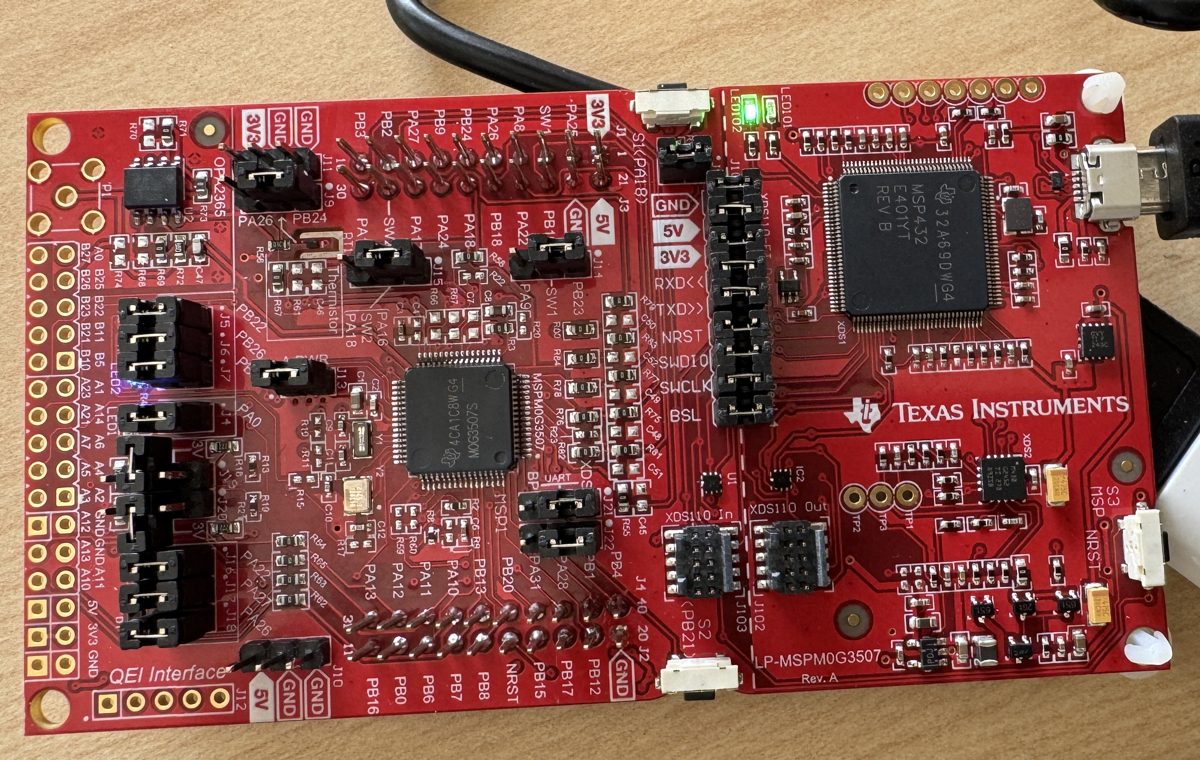
Quick facts
| Board | LP-MSPM0G3507 |
|---|---|
| Chip | MSPM0G3507 |
| Core | Cortex-M0+ |
| Clock | 80 MHz |
| Flash | 128 kB |
| RAM | 32 kB |
| Radio | None |
| Notable peripherals | 2 x 12-bit 4 Msps ADC, up to 17 channels; 12-bit 1 Msps DAC; 2 zero-drift op-amps; 3 comparators; math accelerator (DIV, SQRT, MAC, TRIG); AES-128/256, TRNG |
| On-board debug probe | Built into the board |
| Zephyr board name | lp_mspm0g3507 |
| Where to buy | TI.com |
| Toolchains that ran | TI compilers, GCC, Zephyr, FreeRTOS, Arduino, MicroPython, CCStudio |
Get it running
First blink: 2 min 29 s from plug-in to a changed blink (Mac software already installed; run from VS Code driving).
Plug the board into your computer with its USB cable. No driver to install.
In Chrome or Edge, open the browser bench and click Connect.
Pick Blink LED2 red: 150, 150, 150, 900 ms and click Flash. The page writes it to the board.
You should see: LED2 red (PB26) flashes twice, then pauses.
J6 ON for red, J7 ON for green, J5 ON for blue; J101 15:16 and 13:14 ON for the onboard debugger
Install CCStudio 21.0.1 and the MSPM0 SDK 2.11. Free with a myTI login. On a Mac,
mac-setup/bootstrap.shin the repository does both after you sign in.File, Import Project, and pick:
/Applications/ti/mspm0_sdk_2_11_00_07/examples/nortos/LP_MSPM0G3507/driverlib/gpio_toggle_outputClick the green Debug button, then Resume.
You should see: an LED on the board blinks. The pattern is the delay in gpio_toggle_output.c: change it, build and flash again, and the blink changes.
Copy TI's blink example and build it with GCC.
cp -R <SDK>/examples/nortos/LP_MSPM0G3507/driverlib/gpio_toggle_output . make -C gpio_toggle_output/gcc MSPM0_SDK_INSTALL_DIR=<SDK> SYSCONFIG_TOOL=/Applications/ti/sysconfig_1.26.3/sysconfig_cli.sh GCC_ARMCOMPILER=<GCC folder>Flash the .out with OpenOCD.
openocd -s <OCD>/openocd/scripts -f boards/ti/lp_mspm0g3507/support/openocd.cfg -c "adapter serial <serial>" -c init -c "reset halt" -c "program <file>.out verify" -c mspm0_board_reset -c shutdown
Replace the parts in angle brackets. Run it from the terminal in VS Code, CCStudio or any IDE.
You should see: an LED on the board blinks. The pattern is the delay in gpio_toggle_output.c: change it, build and flash again, and the blink changes.
What works
- CoreMark: 183.61 (2.3 per MHz) (TI Arm Clang, bare metal, -O3; 80 MHz; 2 runs)
- Interrupt latency, pend to first handler line: 29 cycles (bare metal; 80 MHz)
- GPIO toggle: 1.0 cycles (one register write; 16 back-to-back STR minus a SysTick pair; 80 MHz)
- Blink image size: 472 B of flash, 512 B of RAM (bare metal)
- Room-occupancy AI model, one inference: 4.0 ms (-O3; 80 MHz)
- Control loop, trigger to new PWM value: 12.35 µs (-O2; 80 MHz; 3 runs)
- AES-128: 17.01 cycles/B in hardware (TI Arm Clang, -O2; 80 MHz)
- RTOS task switch round trip: 6.717 µs (Zephyr; 80 MHz)
- Fastest ADC with DMA: 3.93 Msps (adc12_max_freq_dma; 1k samples in 260.7 us; supply 3.29 V; 32 MHz)
- Full redraw of a 320 x 480 SPI screen: 67.2 ms (80 MHz)
Download every result for this board (CSV), or compare it on this board on the Benchmarks page.
Projects and ports that ran here
- Blink an LED: 2 min 29 s from board in hand to a blinking LED, tools already installed
- Run a small AI model on the chip: 4.0 to 129 ms per answer, fastest build on this chip
- Recognize handwriting with Edge AI: 34 ms to read one digit
- Show graphics and read touch on a small screen: 67 ms full-screen fill at 40 MHz SPI
- Measure how fast a chip runs: 183.6 CoreMark score at the board's top clock
- Measure how fast a chip reacts: 29 to 36 cycles from interrupt to first instruction
- Build and flash from the terminal: 262 of 270 build TI examples built
- Run Zephyr on a LaunchPad: Zephyr blinky runs; 3 min to install with this repo's script
- Print a message from the board on your computer: Zephyr sample prints its LED state over USB serial
- 2048 and Minesweeper on the LP-MSPM0G3519 with a 3.5 inch touch display Works: 2048 and Minesweeper run on the MSPM0 G3519 with a 3.5 inch touch display.
- Arduino display libraries on the LP-MSPM0G3507 Works: Arduino_GFX's graphics test draws on an ST7796S screen on the MSPM0 G3507, through a 649-line Arduino API layer under the unmodified libraries.
- BitNetMCU handwriting AI on MSPM0 Works: BitNetMCU handwriting models read all 10 test digits right on the MSPM0 G3507 and MSPM0 L1306, the same answers as on a Mac.
- Five STM32CubeG0 examples through TI's migration skill on the LP-MSPM0G3507: 3 ran as written, 2 after fixes Works: TI's migration skill (a tool inside CCStudio that rewrites ST code for a TI chip) moved five STM32CubeG0 examples to the MSPM0 G3507: 3 ran as written, 2 after fixes.
- MicroPython 1.29.0 on the LP-MSPM0G3519 and LP-MSPM0G3507 Works: A new MicroPython port boots on the MSPM0 G3519 with the MicroPython banner and drives a 3.5 inch touch screen from Python.
- minmea GPS sentence parser on MSPM0 Works: minmea, an NMEA GPS parser, runs on the MSPM0 G3519 with its files unchanged and a 21-line shim for one missing call.
- MSPM0 examples moved up and down the family Works: MSPM0 examples move between family members with only the SysConfig device changed (SysConfig is TI's pin and peripheral setup tool): all 133 images that built and write nothing outside main flash and SRAM ran on the MSPM0 L1306.
- Peanut-GB Game Boy emulator on MSPM0 and MSPM33 Works: Peanut-GB plays Tobu Tobu Girl on the MSPM33 C321A with the Educational BoosterPack screen at the console's own speed.
- TI's MSPM0 DriverLib examples built and run with GCC Works: TI's MSPM0 DriverLib examples build and run with GCC from a terminal: all 224 no-RTOS examples with a GCC makefile built unchanged.
- uLisp Lisp interpreter on the LP-MSPM0G5187, LP-MSPM0G3507 and LP-MSPM0G3519 Works: uLisp, an Arduino sketch, gives a Lisp prompt on the MSPM0 G5187's serial port: 19 of 19 REPL (type-and-run loop) checks pass.
- wasm3 (WebAssembly interpreter) on the LP-MSPM0G3519, LP-MSPM0G3507 and LP-MSPM33C321A Works: wasm3 runs a WebAssembly module on the MSPM0 G3519 and prints PASS on the serial line.
- Arduboy2-compatible layer and three open-source games on MSPM0 and MSPM33 Could work: Snake, TileWorld and Crate Confusion build unchanged against an Arduboy2-compatible layer for four kits, and Snake draws on the MSPM33 C321A's Educational BoosterPack screen.
- BoosterPack drivers (Educational MKII, Sharp128, Audio, Sensors MKII, NPU DSP) on LaunchPad kits of other families Could work: Portable C cores for BoosterPacks ran: the Educational pack on the MSPM0 L1306 and MSPM33 C321A, the Sharp128 panel on the MSPM0 C1104, the Audio pack on the AM13E230 and the Sensors pack on the MSPM0 G5187.
- MSPM0 code on the CC2340R5 and CC1354P10 radio chips Could work: MSPM0 driver examples build for the CC2340R5 with a 47-line shim, the first 5 ran with the same pin states as TI's own build, and 4 of 4 ran on the CC1354P10.
- One app, three ways: DriverLib, TI Drivers and Zephyr Could work: The same 81-line app builds three ways on the MSPM0 L1306, and the DriverLib and Zephyr builds ran with the same readings.
- Wiring demo: A 3.5 inch touch screen on 12 jumper wires, 13 to read pixels back: Full-screen fill 364.9 ms at 8 MHz SPI, 168.1 ms at 16 MHz with 16-bit frames and DMA
- Wiring demo: Loop 1: the chip's voltage maker into its own voltmeter: Gain error 0.34%, gain 0.99656, across 257 DAC steps, 16 ADC reads each, both against the 3.3 V supply
- Wiring demo: Loop 2: the chip texts itself over UART: All 2 kB right at every speed from 9.6 kbaud to 4.5 Mbaud and again from 6.4 to 10.67 Mbaud
- Wiring demo: Loop 3: the chip checks its own PWM: PA13 high in 88 of 600 samples: 14.7% plus or minus 2.8%
Want wireless? Try the LP-EM-CC2340R5 for Bluetooth, Zigbee or Thread or the LP-EM-CC35X1 for Wi-Fi.
Fixes
- If you see
west sdk installprints an empty list on an Intel Mac, use the Arm compiler from SDK 0.17.4 withZEPHYR_TOOLCHAIN_VARIANT=cross-compileand the prebuilt xPack OpenOCD. - If you see Zephyr blinky does not blink after a debugger soft reset, run
mspm0_board_reset, or press reset. - If you see an
aes_*,crc_*,dma_*,mathacl_*oradc12_*_dmaexample HardFaults with no debugger, attach the debugger with halting on, or ignore the end state. - If you see Board gone after
sysctl_power_policy_sleep_to_standbyortimx_timer_mode_pwm_x_trig_stop_restore, unplug and replug USB. - If you see
fatal error: 'main.h' file not found(ported STM32 project), add-I"${PROJECT_ROOT}/Inc". - If you see
error: unknown type name 'uint32_t'inSrc/system_stm32g0xx.c, add#include <stdint.h>. - If you see
makeinDebug/stops withinvalid option -- O, useccs/utils/bin/gmake -B allfrom CCStudio. - If you see
Claude requested permissions to use mcp__ccs-project__changeSysConfigVersion, but you haven't granted it yet, leave CCStudio's.claude/settings.local.jsonout of the run, or run the skill interactively and approve.
How long an AI assistant took here
4 jobs timed with an AI coding assistant on this board, given the board's notes. Time is the median of the runs; passed means a person or a script checked the result. No spend or token counts here.
| Job | Assistant | Notes given | Time | Passed |
|---|---|---|---|---|
| zephyr blink | Fable 5.1 | with the board's notes | 3.9 min | 1 of 1 |
| zephyr blink | Haiku 4.5 | with the board's notes | 10.7 min | 1 of 1 |
| zephyr blink | Opus 5.5 | with the board's notes | 2.8 min | 1 of 1 |
| zephyr blink | Sonnet 5.5 | with the board's notes | 3.9 min | 1 of 1 |
For AI assistants
Point your assistant at this board's AGENTS.md (build, flash and fix notes), this board's llms-full.txt (every page for the board in one file) and the repository's llms.txt (the index).
Sources: mspm0g3507/README.md, mspm0g3507/AGENTS.md, mspm0g3507/FAQ.md, data/results/mspm0g3507.csv, site/data/portfolio.json, site/data/projects.json, site/data/ports.json.