Fox Red Labs / Builds / Edge AI
Run a vision model on a TI Linux board's accelerator and time it
Boot TI's Edge AI Linux on a starter kit and run TI's ready-made models on its C7x accelerator. Read each model's time per picture over a serial cable.
HardNo wiringone evening
Parts and steps
You need
- SK-TDA4VM starter kit the board
- USB-C power supply that gives 20 V at 3 A or more power for the board
- USB stick carries the image to the board when you have no card reader
One-time setup before the board: install the CP210x VCP driver on the Mac, a free download from the bridge chip's maker.BROWSER
Then in System Settings, Privacy and Security, click Allow. Then install the helpers the card-writing scripts use with Homebrew and pip. Checked with lrzsz 0.13.1, pyserial 3.5 and xz 5.8.4 on an Intel Mac, macOS 15.7.9.
brew install lrzsz xz pip install pyserialYou should see: After step 2 plugs the board in, four serial ports appear:
/dev/cu.SLAB_USBtoUART,...UART1,...UART2and...UART4.Check SW1 (BOOT CTL) is all four sliders OFF, the micro-SD card is seated under the board, and plug a micro-B cable from J4 to the Mac.BENCH
Leave the board unpowered for now. The 20 V USB-C supply goes to J14, the power port at the board's edge. Never plug it into J12, the data port.
You should see: The four serial ports from step 1 appear on the Mac. The Linux console is
/dev/cu.SLAB_USBtoUART1on the test Mac; the chip's UART-boot port is...UART2.Open the console first, then power the board: log all four ports with timestamps, one per port, using python3 tda4/tools/conlog.py <port> <log>, at 115200 baud, 8N1.TERMINAL
Power on the board from the 20 V supply.
You should see: On a kit whose card carries no image, silence on all four ports before and after a press of SW2 (reset). That was the case on the test kit, so the card in the box was probably blank.
On a second computer with 15 GB free, download tisdk-edgeai-image-j721e-evm.wic.xz from TI's SK-TDA4VM software page.BROWSER
The file is 1.1 GB, from Processor SDK Linux Edge AI 11.00.00.08, and no login is needed. Check it and record your own hash, because the page shows no checksum.
xz -t tisdk-edgeai-image-j721e-evm.wic.xzYou should see:
xz -tprints nothing and exits cleanly. The test file was 1 GB.No card reader, so the card is written from the board itself.TERMINAL
On the second computer, unpack the image and mount the boot partition, using the disk number
hdiutilprints in place ofdiskN. Then split the image into compressed pieces. Then copytiboot3.bin,sysfw.itb,tispl.binandu-boot.imgfrom/tmp/bootto the folder withtda4/tools/uart_boot.py. Keep the pieces that are not all zeros. For this image they are 000 to 030, 032, 040, 041 and 048, 1.95 GB in all. Copy them into atda4/folder on a FAT32 USB stick of 4 GB or more.xz -dk tisdk-edgeai-image-j721e-evm.wic.xz hdiutil attach -imagekey diskimage-class=CRawDiskImage -nomount tisdk-edgeai-image-j721e-evm.wic diskutil mount -mountPoint /tmp/boot /dev/diskNs1 split -b 268435456 -a 3 -d tisdk-edgeai-image-j721e-evm.wic wic. gzip -1 wic.*You should see: A 13.8 GB raw image after
xz -dk;hdiutilprints a disk number to use fordiskN.Power off.BENCH
Set SW1: 1 ON, 2 OFF, 3 ON, 4 OFF (UART boot). Put the stick in a USB-A port. Run the script, then power on or press SW2.
python tda4/tools/uart_boot.pyYou should see: A stream of
Con the UART-boot port, then the four boot files go in: xmodem, then ymodem, about 3.5 minutes at 9.7 kB/s. ThenU-Boot 2025.01and a=>prompt on the console port.Write the card from the stick, piece by piece.TERMINAL
python tda4/tools/write_from_stick.py unzipYou should see: For each piece,
load usb 0:1,unzipandmmc writeending inblocks written: OK; 323 seconds for the whole image; at the endmmc partlists TI's two partitions.Power off.BENCH
Set all four sliders of SW1 to OFF (SD boot). Make sure the console is being logged, then power on.
You should see:
U-Boot SPL,Starting kernel,Welcome to Arago, thentda4vm-sk login:at 27.7 seconds on the first boot. The root file system grows to the card during it. Log in asroot, no password.Push TI's model-timing script to the board over the console after making its folders.TERMINAL
The board has no network in this route.
python3 tda4/tools/lcmd.py "mkdir -p /root/push /root/night" python3 tda4/tools/push_serial.py tda4/bench/zoo/zoo_bench.py /root/push/zoo_bench.pyYou should see: The push prints a matching sha256 for the file when it arrives.
Run it in the background so the console's Ctrl-C cannot kill it.TERMINAL
The script times every precompiled model in
/opt/model_zoothrough its runtime with TI's TIDL delegate on the C7x and its matrix accelerator, 30 timed runs each. Then read the log. These command lines are assembled from the script, its log and the FAQ rule; the recorded run typed them in pieces.python3 tda4/tools/lcmd.py "setsid nohup python3 /root/push/zoo_bench.py 30 > /root/night/zoo_tidl.log 2>&1 < /dev/null &" python3 tda4/tools/lcmd.py "cat /root/night/zoo_tidl.log"You should see: One line per model, such as
ONR-KD-7060-human-pose-yolox-s-640x640 | keypoint_detection | onnxrt | tidl-c7x | [1, 3, 640, 640] | median 13.76 ms | min 13.72 | max 13.86 | n 30 | rss 284 MB. The 14 zoo models came out between 2.17 ms (MobileNetV1) and 13.76 ms (YOLOX-s pose 640). The TVM models needtda4/bench/zoo/tvm_bench.pythe same way.
Or hand it to a coding assistant
Paste this in a terminal. It hands off to an AI assistant.
git clone --depth 1 --filter=blob:none https://github.com/Fox-Red-Labs/fox-red-labs.git && cd fox-red-labs
./start.sh tda4 linux-vision --assistant claudegit clone --depth 1 --filter=blob:none https://github.com/Fox-Red-Labs/fox-red-labs.git && cd fox-red-labs
py start.py tda4 linux-vision --assistant claudeIt runs the steps above and reports what it saw.
Not Claude Code? Copy this prompt instead.
If something goes wrong
| System Settings never shows the Allow prompt | Scroll to the bottom of Privacy and Security, where a "System software ... was blocked" notice names the driver. |
| The console later goes silent after you move the cable to another USB port | Probe all four ports again: the console can come back under another name. A 5 V charger can reset the board during boot. |
| You connect after the board has booted you may see nothing even after Enter: press SW2 with the console open. Silence also looks like a wrong SW1 setting or the wrong port | So check both before writing the card. |
| With a micro-SD card reader, TI's route is shorter | Write the file to the card with balenaEtcher, or from a terminal with tda4/tools/write-card.sh diskN path/to/image.wic.xz, then skip to step 8. That route was not run on this kit. |
Edit the console port in the scripts in tda4/tools/ and the piece list in write_from_stick.py for your Mac and image | Skip all-zero pieces: gzcat f | tr -d '\0' | wc -c is not 0 for the ones to keep. |
More troubleshooting
It stops at the third file (spl: ymodem err - Timed out) | Press SW2 and run it again. Use the current version of the Python script, and no shell loop. Do not try U-Boot's ums command: it crashes U-Boot on this kit and you are back at this step. |
| A piece that takes more than a minute is stuck | Reset with SW2 and begin again from step 6. |
| The write was interrupted | Run write_from_stick.py unzip again from U-Boot: every piece goes to a fixed block address, so a rerun overwrites the same places. |
The red Direct firmware load for j7-mcu-r5f0_1-fw failed with error -2 lines and Failed to start Start psplash boot splash screen are harmless | Three R5F cores have no firmware on the image and there is no display. |
| At step 9 | Push files as 76-column base64 only, which push_serial.py does; a single long line hangs the console at a > prompt. |
| A model takes hundreds of milliseconds | It ran on the CPU. Load the model's precompiled artifacts folder instead of the bare ONNX file. Then check the runtime log lists every node on the C7x, 274 of 274 for the pose model. Start long jobs with setsid nohup; a plain nohup ... & died at the next connect. |
Every fix for this board: the FAQ.
What to build next
Every build. The code for all of them is in the GitHub repository.
Evidence and limitsThe SK-TDA4VM boots in 24 s and runs TI's zoo models in 2.2 to 13.8 ms on the C7x; its two A72 cores take 13 to 135 times longer on the same models. Ran on 1 board. Results, sources, timing and limits.
Expected result: A Linux login prompt 27.7 seconds after power-on, and one timing line per zoo model, each between 2.17 and 13.76 ms on the C7x. The pose model, the biggest, reads 13.76 ms.
What this shows
- TI's Edge AI Linux boots on the SK-TDA4VM from a card written with no card reader, Ethernet or display. That was one kit and one Mac.
- All 14 of TI's zoo models run on the C7x and its matrix accelerator in 2.17 to 13.76 ms each. TI's four published figures are within 10 percent of the measured values.
- The same eight ONNX models take 13 to 135 times longer on the two Arm cores with the CPU provider. A model that falls back to the CPU costs that much on this image.
What this does not establish, and limits
What this does not establish
- No picture was shown to the models: the input is random numbers, and outputs were not compared. These are times only; accuracy was not measured.
- The CPU comparison is fp32 on the CPU against int8 on the accelerator. It shows the cost of falling back to the CPU and is no like-for-like comparison of the two cores.
- These timings come from one run. No independent builder has repeated them.
- Sustained load was not shown to be safe. The board reset about 60 seconds into a two-thread CoreMark plus TIDL loop. A five-minute pose graph took the hottest zone to 91.5 C.
- A card reader, an Ethernet link, a display or a camera were never used, so the camera and display paths are untested.
Limits to keep in mind
- The board had no card reader, Ethernet or display; the whole route is the serial cable at 9.7 kB/s for the boot files. TI's own route, which needs a reader and a display, was not run.
- TI's getting-started page assumes a display and Ethernet; the model-zoo layout was learned by listing folders.
- The board resets under heavy sustained load; it runs on a 20 V supply of unknown wattage with a passive heatsink and no fan.
- The TVM build of ssdLite mobDet 320 is 12.97 ms against 6.40 ms for the TFLite build. Suspected cause: the input conversion inside the graph.
Sources
Why this board
The SK-TDA4VM is the only Linux board with a deep-learning accelerator on this bench. Its C7x DSP has a matrix accelerator that TI rates at 8 TOPS, int8. The microcontroller boards have no Linux and no accelerator of this class.
Versions, sizes and timing
| Board and image | SK-TDA4VM (J721EXSKG01EVM) revision PROC112A1, TI Edge AI SDK 11.00.00.08, Linux 6.12.17-ti, gcc 13.3, Python 3.12 | README notes |
|---|---|---|
| Runtimes | ONNX Runtime 1.15.0 with the TIDLExecutionProvider, TFLite through libtidl_tfl_delegate, DLR 1.13.0 for the three TVM models | RESULTS TDA4 notes |
| Method | Precompiled int8 artifacts from /opt/model_zoo, random input, one warm-up, 30 timed runs, median wall time in Python; timing only, outputs not compared | |
| C7x time per picture | 2.17 ms (MobileNetV1 mlperf 224) to 13.76 ms (YOLOX-s pose 640); regNetx-200mf 2.89 ms, YOLOX-nano-lite 416 4.66 ms, ssd-lite-mobv2 512 6.10 ms | |
| Two A72 cores, same ONNX models | fp32 graphs on the CPU provider, 3 timed runs: 37.4 ms to 1,767 ms, 13 to 135 times slower; the zoo ships no int8 CPU build | TDA4 C7X vs A72 notes |
| Against TI's published figures | TI's four published C7x figures (2.03, 3.04, 5.03 and 5.9 ms) are within 10 percent of the measured values | TDA4 C7X vs A72 notes |
| First boot | 27.7 s from the first bootloader byte to the login prompt, with the root file system growing to the card; warm boot 24.0 to 24.5 s | README notes |
| Cores and memory | Two Cortex-A72 at 1.998 GHz measured by perf; Linux sees 2,170 MiB of the 4 GiB | README notes |
Evidence
- All 14 zoo models ran on the C7x on 2026-10-09 and 2026-10-10: 2.17 to 13.76 ms each, with the runtime's log listing every node on the accelerator, 274 of 274 for the pose model. TDA4 C7X vs A72 notes
- The raw timing lines come from the script in step 10.
- The first boot was logged on the Mac's clock from the first bootloader byte to the login prompt.
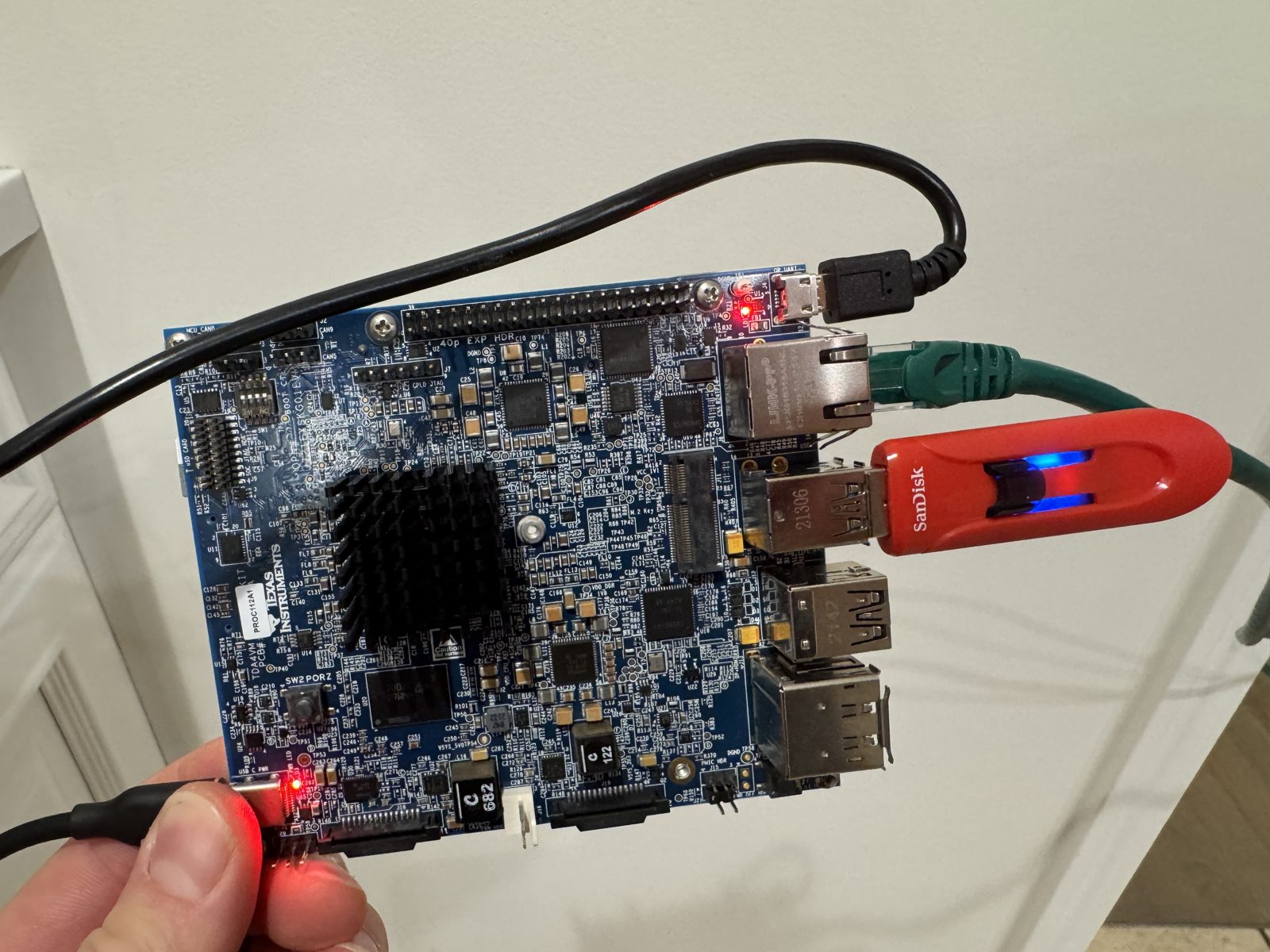
- A photo of the board on the bench. sk-tda4vm-on-bench.jpg
Other boards
- MSPM0G3507, MSPM0L1306, CC2340R5, F2800137Not for this chip no software for it
What the status words mean
Works ran here and did what it shouldCould work some of it ran; real porting effort is left; hover for whatNot for this chip the chip or its vendor software cannot; hover for why
Result grid
Works ran here and did what it shouldShould work it builds; only naming, packaging or build glue is in the way; hover for whichCould work some of it ran; real porting effort is left; hover for whatNot for this chip the chip or its vendor software cannot; hover for why
Experiments (7)
| Status | What was tried | Result |
|---|---|---|
| Works | Can NVIDIA's Holoscan body-pose demo run on the SK-TDA4VM, and what does the same graph cost on TI's parts? SK-TDA4VM, 2026-10-09 | NVIDIA's Holoscan SDK cannot run on the TDA4VM (its build and runtime need CUDA; the board has no NVIDIA GPU and the R5F cores run TI's RTOS firmware with no Linux). The same operator graph as Holoscan's body-pose... |
| Can the SK-TDA4VM be a Holoscan Sensor Bridge: camera in, Hololink frames out over 1000BASE-T? SK-TDA4VM, 2026-10-10 | NVIDIA's own Holoscan Sensor Bridge device emulator (Apache-2.0) builds on the SK-TDA4VM's Cortex-A72 Linux in 27 s with no CUDA and speaks the full Hololink protocol. Over a real 1 GbE link to this repo's checker on... | |
| Works | Does the SK-TDA4VM's SA2UL crypto block beat the Cortex-A72's crypto instructions for bulk AES and SHA on TI's Edge AI Linux? SK-TDA4VM, 2026-10-10 | The TDA4VM's SA2UL crypto block is in the Edge AI kernel and the kernel prefers it (cbc-aes-sa2ul at priority 30,000), but no shipped tool reaches its AES from user space: openssl's afalg engine fails because... |
| Works | Can the SK-TDA4VM's hardware video decoder feed the C7x with no Cortex-A72 copy of the pixels, and what does the zero-copy path save? SK-TDA4VM, 2026-10-10 | Yes. With TI's zero-copy settings (v4l2h264dec capture-io-mode=5 feeding tiovxmemalloc), which by TI's description let the decoder write straight into buffers the C7x reads, a decode-to-detection pipeline (1280x768... |
| Works | How much faster is the SK-TDA4VM's C7x and MMA than its two Cortex-A72 cores when a TI model-zoo network runs on the CPU instead? SK-TDA4VM, 2026-10-10 | On eight TI model-zoo networks the C7x DSP with its MMA accelerator ran the same model 13 to 135 times faster than the two Cortex-A72 cores: 2.9 ms against 37 ms for regNetx-200mf (13x), 4.7 against 193 ms for... |
| Could work | Does the SK-TDA4VM reach a first inference in under an hour from the sealed box, with only public documents? SK-TDA4VM, 2026-10-10 | No, not at this bench. From the sealed box to a Linux prompt took about 2 h 30 min of working time, and the first model inference came about 40 minutes after that, about 3 h 10 min in all. Two things took the time... |
| Works | Can Frigate use the BeagleY-AI's C7x accelerator as its object detector? BeagleY-AI, 2026-11-03 | Frigate 0.18.2 tracks two people and a dog with its detector on the C7x (64.46 ms per detection against 184.56 ms on its CPU detector); the USB webcam as the input drops off USB within seconds of Frigate opening it, 2... |
Source files
- Bench results (SK-TDA4VM): numbers measured on the bench
Code brought from elsewhere
This project uses code that was written for other chips or tools. Each links to how to get it running.
- NVIDIA Holoscan's camera graph on the SK-TDA4VM Could work NVIDIA Holoscan needs CUDA, so its camera graph is rebuilt from TI parts on the SK-TDA4VM: YOLOX-s pose takes 13.8 ms on the C7x accelerator.
Get the code and tell us how it wentThe clone command, the board folder with its AGENTS.md, reports from others, and the three report forms.
Get the code
Clone the repository and open the board's folder below. AGENTS.md is a plain text file of notes for AI coding assistants, and llms.txt at the root indexes the site for one.
git clone https://github.com/Fox-Red-Labs/fox-red-labs.git- SK-TDA4VM: folder
tda4/.- README: the board's lab notebook (what was run, in order)
- Notes for an AI coding assistant working in this repository: notes for an AI assistant; copy it into your own project if you use one
- FAQ: errors and fixes
Code is BSD-3-Clause, writing is CC BY 4.0; third-party folders keep their own licenses.
Built it? Tell us
Built this, or got stuck? Report it on GitHub with a few short answers. Your report shows here in your words, marked as yours. A failure that repeats on the bench gets its fix here.