Fox Red Labs / Builds / Arcade
Doom on a TI board
The Doom engine runs on a microcontroller kit, and on the AM62L Linux board it draws straight to the HDMI screen. Shareware data only; you supply the game file.
HardNo wiring
Parts and steps
Which version
You need
- LP-EM-CC35X1 LaunchPad development kit plays the demos with no screen; the console prints frame checksums and the rate
- LP-XDS110ET debugger Buy programs the CC35X1
- LP-MSPM33C321A LaunchPad development kit plays the demos on a screen; its 16 MB QSPI flash holds the game data
- BOOSTXL-EDUMKII Educational BoosterPack MKII the 128 by 128 screen the M33 draws on
Fetch the engine and convert the game data.TERMINAL
Fetch the engine at its pinned commit, patch it, download the shareware data file and convert it to the compact WHX format (1.7 MB).
cd ports/doom ./fetch.sh m33-whx/convert.shYou should see:
wad-cache/DOOM1.whxexists.fetch.shchecked the data file against its SHA-1.Build the LP-EM-CC35X1 image.TERMINAL
Build and sign the image. The converted data file is linked into it and read in place from the board's flash.
target-cc35x1-whx/build.shYou should see: The script prints a build folder and the signed Toolbox files under
ex/freertos/ticlang/toolbox/.Program the board.TERMINAL
Connect the XDS110 probe and program the signed build with the Wi-Fi Toolbox, then reset the board.
Replace <build folder> before you run this.
/Applications/ti/simplelink_wifi_toolbox_macos_4_3_23/simplelink-wifi-toolbox programmer -i XDS110 programming --tool_settings <build folder>/ex/freertos/ticlang/toolbox/tool_settings.jsonYou should see: The programmer reports success for every region and the board resets.
Read the demos finish.TERMINAL
Open the probe's serial port at 921,600 baud. The console prints a checksum line every 100 frames and a line at each demo end.
You should see:
CRC n xxxxxxxxlines, thenDEMOEND k frames=three times (1,736, 3,092 and 3,881 frames),EXIT,FPS after400near 39 andDONE.Or build it for the LP-MSPM33C321A screen.TERMINAL
The M33 has 1 MB of flash, so the data file goes in the board's QSPI flash first (
ports/doom/m33-whx/E27-qspi-dump-and-load.md). Then build the real-time screen image with the page cache and flash it with DSLite as in the other M33 pages.EDU=1 BOARD=1 WHXCACHE=8 RT=1 NOCRC=1 WHX_CRC32=0xe9018e36 m33-whx/build.sh 30You should see: With the Educational BoosterPack on the LaunchPad the 128 by 128 screen shows the Doom title, then the first demo at about 22 frames a second.
You need
- TMDS62LEVM runs Linux and the game
- PS4 DualShock 4 game pad on a USB cable plays the game
Fetch the engine and the game data.TERMINAL
Fetch the engine at its pinned commit, patch it and download the shareware data file.
cd ports/doom ./fetch.shYou should see:
src-upstream/doomgeneric/andwad-cache/DOOM1.WADexist, and the data file's SHA-1 was checked.Copy the sources to the board.TERMINAL
Copy
srclist.sh,linux-fb/,src-upstream/doomgeneric/andwad-cache/DOOM1.WADinto/root/doomon the board, keeping their folder names.You should see:
/root/doomon the board holds the four items.Build the game on the board.BOARD
Build in the container on the board. It takes about 75 seconds on the two cores.
sh linux-fb/build.sh /root/doomYou should see:
build/fb/doom_fbexists.Run the timing demo.BOARD
Stop the display demo that owns the screen, then run the timing demo.
systemctl stop ti-lvgl-demo
./build/fb/doom_fb -iwad wad-cache/DOOM1.WAD -timedemo demo1 -nosound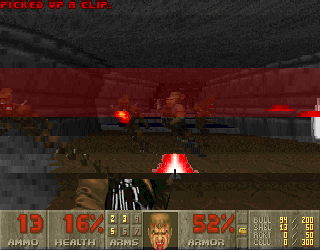
You should see: The monitor shows the game at 4:3 and the last line reports 186 to 193 frames a second.
Play with a game pad.BOARD
Plug the pad into the board and start the game. Stick up walks forward; Cross fires, Square uses, Circle runs, Options is the menu.
DOOM_FPS_EVERY=5 ./build/fb/doom_fb -iwad wad-cache/DOOM1.WAD -nosoundYou should see: The game takes the pad and prints its frame rate every five seconds.
Give the screen back.BOARD
Stop the game and start the display demo again.
pkill doom_fb systemctl start ti-lvgl-demoYou should see: The monitor shows the board's display demo again.
Or hand it to a coding assistant
Paste this in a terminal. It hands off to an AI assistant, which says when to plug in each of the two boards.
git clone --depth 1 --filter=blob:none https://github.com/Fox-Red-Labs/fox-red-labs.git && cd fox-red-labs
./start.sh mspm33c321a doom --assistant claudegit clone --depth 1 --filter=blob:none https://github.com/Fox-Red-Labs/fox-red-labs.git && cd fox-red-labs
py start.py mspm33c321a doom --assistant claudeIt runs the steps above and reports what it saw.
Not Claude Code? Copy this prompt instead.
Or hand it to a coding assistant
Paste this in a terminal. It hands off to an AI assistant.
git clone --depth 1 --filter=blob:none https://github.com/Fox-Red-Labs/fox-red-labs.git && cd fox-red-labs
./start.sh am62l doom --assistant claudegit clone --depth 1 --filter=blob:none https://github.com/Fox-Red-Labs/fox-red-labs.git && cd fox-red-labs
py start.py am62l doom --assistant claudeIt runs the steps above and reports what it saw.
Not Claude Code? Copy this prompt instead.
If something goes wrong
fetch.sh stops on a hash mismatch | Delete wad-cache/ and run it again; do not use a file it refused. |
| The link fails on region size | The build used the dual-image layout; the script switches OTA off, so rerun it from a clean checkout. |
| The programmer fails with error -260 on every call | Remove any BoosterPack and replug the probe cable. |
| The port prints nothing | Check the baud rate: the console is 921,600 here, not 115,200. |
| The screen stays blank | The QSPI write did not finish: read the flash back (the dump firmware in m33-whx/board/) and compare it with wad-cache/DOOM1.whx. |
Every fix for this board: the FAQ.
| It stops on a hash mismatch | Delete wad-cache/ and run it again. |
| The board does not answer on the network | Check its address on the serial console first. |
| The container cannot pull its image | The board has no route to the registry: fix the network, then rerun. |
| The screen stays on the display demo | ti-lvgl-demo did not stop: run systemctl stop ti-lvgl-demo again. |
| The buttons do the wrong thing on a DualShock 4 | The kernel has hid-generic on the pad; the game prints hid-generic DualShock 4 button table at start and uses it. Any other pad uses the standard names. |
More troubleshooting
| The screen stays black | Start the display demo again. |
Every fix for this board: the FAQ.
What to build next
Every build. The code for all of them is in the GitHub repository.
Evidence and limitsDoom plays its three demos on the CC35X1 at 39.2 frames a second and on the MSPM33 C321A screen at 22.7; the AM62L draws it to HDMI at 186 to 193. Ran on 3 boards. Results, sources, timing and limits.
A. On a microcontroller kit (LP-EM-CC35X1, LP-MSPM33C321A)
Expected result: The CC35X1 plays the three shareware demos to the end and prints the rate and frame checksums on its console. The MSPM33 C321A draws the game on the BoosterPack screen.
What this shows
- The rp2040-doom design fits a 256 kB chip: 228 kB of static data and zone, against 164 kB static plus 800 kB zone for the plain engine.
- The CC35X1 plays three demos at 39.2 frames a second, with frame checksums equal to a Cortex-M33 emulator running the same image.
- The MSPM33C321A reads 1.7 MB of game data from its QSPI flash through a software page cache (98 to 99 percent hits) and draws in real time at 22.7 frames a second.
What this does not establish, and limits
What this does not establish
- It has been played by hand with the BoosterPack's stick and buttons; the frame rate during hand play was not timed.
- The 3.5 inch touch panel image for the CC35X1 builds and links; it has not been run on a panel.
- Sound, and the other six levels of the shareware episode: only the three demo levels were played.
Limits to keep in mind
- The CC35X1 rate is on a stepped game clock, about three game tics per frame, so the demo runs faster than real time. It is not the same test as the M33's real-time 22.7.
- A 16 kB page cache on the M33 leaves 151 bytes of RAM free.
- The MSPM0 G3519 (128 kB of RAM) and MSPM0 G3507 (32 kB of RAM, 128 kB of flash) stop at static data alone.
Sources
Versions, sizes and timing
| Design | rp2040-doom: data kept compressed (WHX, 1.7 MB) and read in place; 16-bit pointers into a 256 kB window; a new renderer | WRITEUP notes |
|---|---|---|
| CC35X1 frame rate | 39.2 frames a second at 160 MHz, render files at -O2, statics in the 128 kB fast RAM | the data (CSV) |
| M33 frame rate | 22.7 (8 kB cache) and 24.5 (16 kB cache), real time, on the screen | the data (CSV) |
| QSPI read | 256 bytes in 23.8 microseconds | the data (CSV) |
Evidence
- On the CC35X1 the three demos finish: 1,736, 3,092 and 3,881 frames, the frame checksums equal the emulator's, 39.2 frames a second after frame 400. README notes
- On the MSPM33 C321A with the Educational BoosterPack screen the game ran in real time at 22.7 frames a second with an 8 kB page cache and 24.5 with 16 kB. the data (CSV)
- On the same board the three demos finished from the QSPI flash at 19.9 frames a second (8 kB cache) and 21.9 (16 kB cache), with the emulator's frame checksums. the data (CSV)
- The plain engine needs 593 kB of zone memory at the least, which is why the rp2040-doom design is used here. doom smallest ti chip notes
Other boards
- MSPM0L1306, CC2340R5, F2800137
- AM62L32ran another way
- MSPM0G3507, MSPM0G3519Not for this chip not enough RAM
What the status words mean
Works ran here and did what it shouldCould work some of it ran; real porting effort is left; hover for whatNot for this chip the chip or its vendor software cannot; hover for why
B. On the AM62L Linux board, straight to the screen
Expected result: The AM62L draws Doom on its HDMI output with no GPU, and a game pad plays it.
What this shows
- A frame-buffer port reaches 186 to 193 frames a second at 1280 by 1000; the same engine through Weston and a software GL renderer reaches 6.5.
- The picture is 320 by 200 scaled by whole numbers to 1280 by 1000 and reads as 4:3 on the monitor.
What this does not establish, and limits
What this does not establish
- The timing figure is the engine's own timing run, not the monitor's refresh rate: there is no vsync, so a fast turn can tear.
- Sound: the game runs with
-nosound.
Limits to keep in mind
- The board reaches 413 frames a second unscaled and 241 at 960 by 800; the scale you pick sets the rate.
- 320 by 200 shown 4 by 5 times is 1280 by 1000, aspect 1.28 against the 1.33 of a 4:3 screen; it is the nearest whole-number pair that fits 1080 lines.
Sources
Versions, sizes and timing
| Timing demo | demo1: 185.8 to 192.7 frames a second at 1280 by 1000, 240.6 at 960 by 800, 412.9 at 320 by 200 | the data (CSV) |
|---|---|---|
| Through Mesa llvmpipe | 6.54 frames a second (Chocolate Doom 3.1.0, one run) | AM62L doom controller notes |
| Build | GCC 14.2.0 -O2 static in a Debian trixie arm64 container, about 75 s on the board | README notes |
Evidence
- The timing demo runs at 185.8 to 192.7 frames a second at 1280 by 1000 (four runs), 240.6 at 960 by 800 and 412.9 unscaled, on both A53 cores at 1.25 GHz. the data (CSV)
- Chocolate Doom through Weston and Mesa llvmpipe ran the same demo at 6.54 frames a second, which is why this version writes to the framebuffer itself. AM62L doom controller notes
- Stick up walks forward on a PS4 pad and the picture reads as 4:3 on the monitor; both were checked by eye on the board. the data (CSV)
Other boards
- MSPM0L1306, CC2340R5, F2800137
- CC35X1, MSPM33C321Aran another way
- MSPM0G3507, MSPM0G3519Not for this chip not enough RAM
What the status words mean
Works ran here and did what it shouldCould work some of it ran; real porting effort is left; hover for whatNot for this chip the chip or its vendor software cannot; hover for why
Result grid
Works ran here and did what it shouldShould work it builds; only naming, packaging or build glue is in the way; hover for whichCould work some of it ran; real porting effort is left; hover for whatNot for this chip the chip or its vendor software cannot; hover for why
Experiments (2)
| Status | What was tried | Result |
|---|---|---|
| What is the smallest TI chip that runs the real Doom engine? The LP-MSPM33C321A, with a smaller engine design MSPM33 C321A, 2026-10-20 | The plain Doom engine links for the MSPM33 C321A but needs 164 kB of static data plus an 800 kB zone. The rp2040-doom design (m33-whx) finishes all three shareware demos on the chip's real 256 kB with a software... | |
| Works | Does Chocolate Doom run on the AM62L with no GPU, and does a wired PS4 controller reach it? TMDS62LEVM (AM62L evaluation module), 2026-10-24 | Chocolate Doom 3.1.0 with the shareware WAD runs a demo1 timedemo at 6.54 fps (one run) on the AM62L's HDMI output with no GPU, because SDL's scaler lands in Mesa llvmpipe. A wired PS4 controller reaches Linux: 11... |
Source files
- target CC35X1 whx notes (CC35X1)
- Bench results (MSPM33 C321A): numbers measured on the bench
- Measured results (data file) (TMDS62LEVM): the raw numbers
Code brought from elsewhere
This project uses code that was written for other chips or tools. Each links to how to get it running.
- Doom engine (doomgeneric and rp2040-doom's design) on the LP-EM-CC35X1 and the LP-MSPM33C321A Works The rp2040-doom design plays all three shareware demos on the CC35X1 and the MSPM33 C321A, with frame checksums equal to a Cortex-M33 emulator.
Get the code and tell us how it wentThe clone command, the board folder with its AGENTS.md, reports from others, and the three report forms.
Get the code
Clone the repository and open the board's folder below. AGENTS.md is a plain text file of notes for AI coding assistants, and llms.txt at the root indexes the site for one.
git clone https://github.com/Fox-Red-Labs/fox-red-labs.git- LP-EM-CC35X1: folder
cc35x1/.- README: the board's lab notebook (what was run, in order)
- Notes for an AI coding assistant working in this repository: notes for an AI assistant; copy it into your own project if you use one
- FAQ: errors and fixes
The other 1 board folder
- LP-MSPM33C321A: folder
mspm33c321a/.- README: the board's lab notebook (what was run, in order)
- Notes for an AI coding assistant working in this repository: notes for an AI assistant; copy it into your own project if you use one
- FAQ: errors and fixes
- LP-MSPM33C321A: folder
Code is BSD-3-Clause, writing is CC BY 4.0; third-party folders keep their own licenses.
Built it? Tell us
Built this, or got stuck? Report it on GitHub with a few short answers. Your report shows here in your words, marked as yours. A failure that repeats on the bench gets its fix here.