Fox Red Labs / Builds / Smart home and radio
Control a CC35X1 Matter light from Apple Home
Build the lighting example, flash the CC35X1, add it to Apple Home. Phone tile and board buttons switch the red LED.
HardNo wiringAbout 20 min after host setup (estimate)
Parts and steps
Which version
You need
- LP-EM-CC35X1 LaunchPad development kit the board
- LP-XDS110ET debugger Buy the debugger that programs the board
- iPhone with the Home app the Matter controller you pair with
- Apple TV (the Home hub) the hub the phone controls the accessory through
- A Mac to program from runs the Toolbox and programs the board
- Linux or Docker host builds the image
Plug the board into the debugger and both USB-C cables into the Mac.BENCH
Set the debugger's TGT VDD jumper to EXT and push the board's 20-pin edge into the debugger. Plug both USB-C cables into the Mac. Leave J4 and J6 on the lower two pins.
You should see: The Mac lists the probe and
xdsdfu -eprints its serial number.Check activation. Activate only for the lifecycle error.TERMINAL
In
/Applications/ti/simplelink_wifi_toolbox_macos_4_3_23, run the read-only activation check. If it prints the fuse table, go on. Only if it stops withProcess is stopped. Life cycle OPERATIONAL is not valid., activate by hand as under “If something goes wrong.”Replace <probe serial> before you run this.
./simplelink-wifi-toolbox programmer -i XDS110 -param1 <probe serial> get_fuse_data --flash_type IS25WJ064F --activation_type sdk_example_key --verboseYou should see: The check prints the fuse table instead of the error. Activation took about 5 seconds.
Build the lighting example on a Linux or Docker host.DOCKER
Build from the repository's
cc35x1/matterfolder. The script downloads four tools, checks each against a published SHA-256, fetches TI's repository at the pinned commit and leaves images in/path/to/work/out/debug. Copytoolboxto the Mac../build.sh /path/to/workYou should see: A signed 1,758.3 kB image (
toolbox/primary_vendor_image.sign.bin, 1.7 MB). The clean build took 673 seconds (11 minutes 13 seconds) under emulation on an Apple silicon Mac.Program the image.TERMINAL
From the repository root, set TB to the copied toolbox folder and run
cc35x1/matter/mac_paths.shto swap Linux paths for local ones. Then change to the Toolbox folder and program the image.Replace <probe serial> before you run this.
TB="/absolute/path/to/copied/toolbox" cc35x1/matter/mac_paths.sh "$TB" cd /Applications/ti/simplelink_wifi_toolbox_macos_4_3_23 ./simplelink-wifi-toolbox programmer -i XDS110 -param1 <probe serial> programming --tool_settings "$TB/tool_settings.mac.json"You should see: The Toolbox reports success after about a minute.
Press S1 to open a pairing window.BENCH
Press S1 (reset) to open a pairing window. The Toolbox does not reset the board. If it was paired before, hold SW1 for 1 second first to wipe the pairing.
You should see: The board advertises over Bluetooth. At 115200 baud the log shows the start. One Wi-Fi disconnect line per boot is TI's known issue MATTER-456.
Scan the QR picture in the Home app.PHONE
In the Home app tap +, then Add Accessory, and scan
cc35x1/matter/setup-qr.png. If the scan fails, tap More options, My Accessory Isn't Shown Here, Enter Code, and type the codecc35x1/matter/payload.pyprints.You should see: The phone finds the accessory and warns Uncertified Accessory.
Tap Add Anyway and name the light.PHONE
Tap Add Anyway, wait about a minute, pick a room and name, tap Done.
You should see: A progress screen, then room and name. In the board's log from the Bluetooth connect: secure channel at 3 s, Wi-Fi at 16 s, commissioning done at 63 s.
Toggle the light from the phone and the board.PHONE
Tap the light tile. Then press SW1 (on) and SW2 (off) on the board.
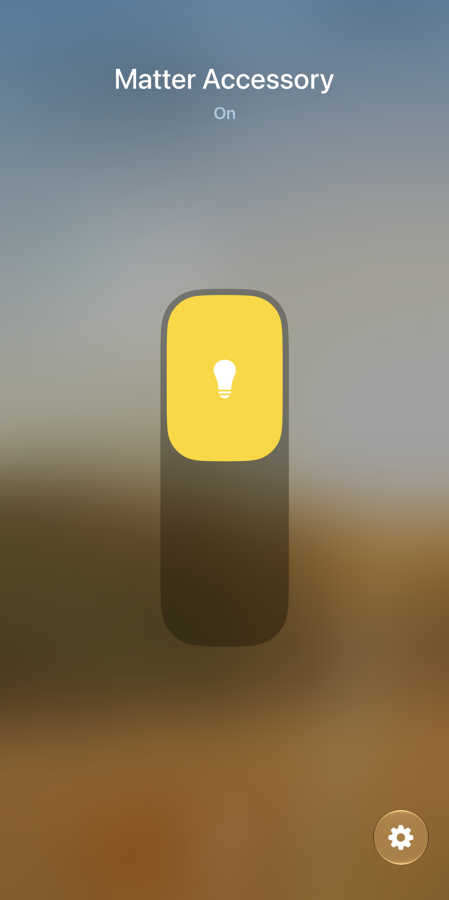
You should see: The tile shows On with a yellow bulb and the red LED follows. Buttons change the tile within about a second.
You need
- LP-EM-CC35X1 LaunchPad development kit the board
- LP-XDS110ET debugger Buy the debugger that programs the board
- iPhone with the Home app the Matter controller you pair with
- Apple TV (the Home hub) the hub the phone controls the accessory through
- A Mac to program from runs the Toolbox and programs the board
- Linux or Docker host builds the image
Plug the board into the debugger and both USB-C cables into the Mac.BENCH
Set the debugger's TGT VDD jumper to EXT and push the board's 20-pin edge into the debugger. Plug both USB-C cables into the Mac. Leave J4 and J6 on the lower two pins.
You should see: The Mac lists the probe and
xdsdfu -eprints its serial number.Check activation. Activate only if the check fails.TERMINAL
In
/Applications/ti/simplelink_wifi_toolbox_macos_4_3_23, run the read-only check. Only if it stops withProcess is stopped. Life cycle OPERATIONAL is not valid., run the second command once. One at a time.Replace <probe serial> before you run this.
./simplelink-wifi-toolbox programmer -i XDS110 -param1 <probe serial> get_fuse_data --flash_type IS25WJ064F --activation_type sdk_example_key --verboseYou should see: The check prints the fuse table instead of the error. Activation took about 5 seconds.
Build the thermostat image on a Linux or Docker host.DOCKER
Build from the repository's
cc35x1/matterfolder. It is TI'smatter-v1.5-ti-1.2-ea.2tag, commit33a45a1ba707418ee9f764723a5b98f2718e8abd, with a thermostat data model and application swapped into the lighting example. Copy thetoolboxfolder from/path/to/work/out/debugto the Mac../build-thermostat.sh /path/to/workYou should see: A signed 1,747.9 kB image (
toolbox/primary_vendor_image.sign.bin). A warm container took 5 minutes 1 second. Cold was never timed in one piece; about 12 minutes is an estimate.Erase the flash, then program the image.TERMINAL
From the Toolbox folder, erase the flash, then program the image. First run
cc35x1/matter/mac_paths.shfrom the repository: the build leaves Linux paths intool_settings.jsonand the Toolbox needs absolute Mac ones. One command at a time.Replace <probe serial> before you run this.
TB=<absolute path of the copied toolbox folder> cc35x1/matter/mac_paths.sh "$TB" cd /Applications/ti/simplelink_wifi_toolbox_macos_4_3_23 ./simplelink-wifi-toolbox programmer -i XDS110 -param1 <probe serial> full_flash_erase --flash_type AUTO_DETECT --activation_type sdk_example_key ./simplelink-wifi-toolbox programmer -i XDS110 -param1 <probe serial> programming --tool_settings "$TB/tool_settings.mac.json"You should see: Erase takes about 16 seconds, programming about 60. On an erased flash the image starts by itself.
Optional: read the start-up log.TERMINAL
Optional. Read the board's serial port,
/dev/cu.usbmodem<probe serial>1, at 115200 baud (8N1). The command below, from the repository, sets the baud and prints the log. Ctrl+C stops it.Replace <probe serial> before you run this.
python3 cc35x1/matter/logread.py /dev/cu.usbmodem<probe serial>1You should see: Within 2 seconds: a boot line, Wi-Fi start, the Matter server and
THERMO ready: UART2_1 115200, endpoint 1 thermostat, endpoint 2 occupancy. Bluetooth advertising starts about 5 seconds after the boot line.Within 5 minutes of boot, scan the QR picture.PHONE
The window is 300 seconds. In the Home app tap +, then Add Accessory, and scan
cc35x1/matter/setup-qr.png. If you cannot scan, choose More options and type the codecc35x1/matter/payload.pyprints. At Uncertified Accessory tap Add Anyway, then pick a room and name.You should see: The accessory appears as a thermostat named "Matter Accessory".
Set Heat at 67 F in the Home app.PHONE
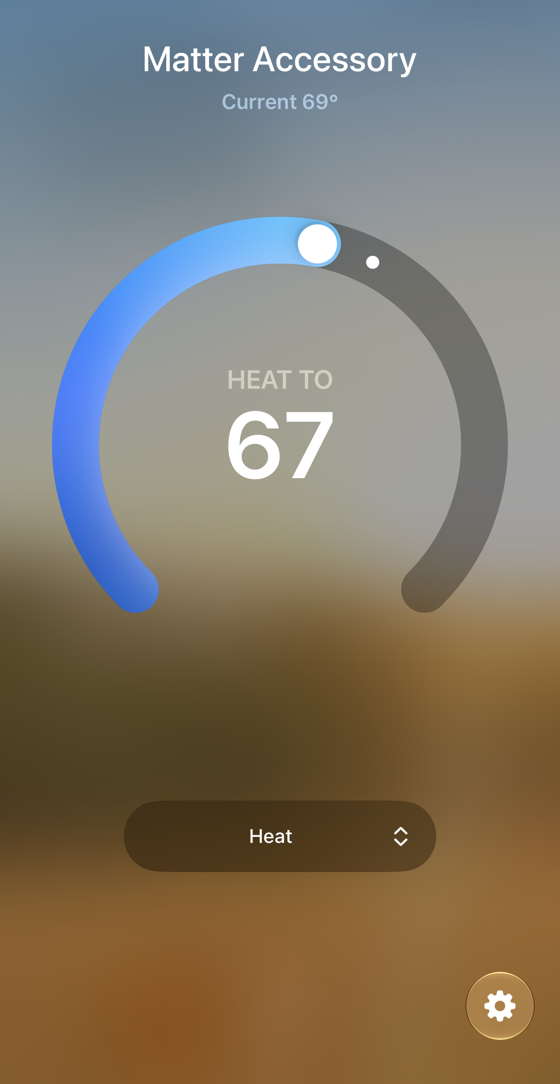
Open the thermostat tile, set Heat and move the heating setpoint to 67 F.
You should see: Heat at 67 F. Current temperature reads 69 F: the board's fixed 20.8 C fallback, since no sensor is wired.
Could work
Or hand it to a coding assistant
Paste this in a terminal. It hands off to an AI assistant.
git clone --depth 1 --filter=blob:none https://github.com/Fox-Red-Labs/fox-red-labs.git && cd fox-red-labs
./start.sh cc35x1 matter-device --assistant claudegit clone --depth 1 --filter=blob:none https://github.com/Fox-Red-Labs/fox-red-labs.git && cd fox-red-labs
py start.py cc35x1 matter-device --assistant claudeIt runs the steps above and reports what it saw.
Not Claude Code? Copy this prompt instead.
Or hand it to a coding assistant
Paste this in a terminal. It hands off to an AI assistant.
git clone --depth 1 --filter=blob:none https://github.com/Fox-Red-Labs/fox-red-labs.git && cd fox-red-labs
./start.sh cc35x1 matter-device --assistant claudegit clone --depth 1 --filter=blob:none https://github.com/Fox-Red-Labs/fox-red-labs.git && cd fox-red-labs
py start.py cc35x1 matter-device --assistant claudeIt runs the steps above and reports what it saw.
Not Claude Code? Copy this prompt instead.
If something goes wrong
| Use both cables | TI says the debugger can brown out during Matter transmissions otherwise. |
| At step 2 | Activation cannot be undone. |
| The fuse table prints | The chip is already activated: do nothing. Only for the exact lifecycle error, type this by hand, never paste it: ./simplelink-wifi-toolbox programmer -i XDS110 -param1 <probe serial> custom_activation --flash_type IS25WJ064F --activation_type sdk_example_key --authentication_enabled yes. The Copy button copies only the check, on purpose. |
| Needs 6 GB free | Afterward run docker volume rm frl-matter-build. |
| The SysConfig 1.28.0 installer is gone | The script uses 1.28.1 build 4785, which built this image. |
More troubleshooting
| Another TI image was on the board (above all Wi-Fi CSI presence) and the serial port stays silent | Save what you need, erase, and program again: ./simplelink-wifi-toolbox programmer -i XDS110 -param1 <probe serial> full_flash_erase --flash_type AUTO_DETECT --activation_type sdk_example_key. This wipes the old image and settings. Skip it on a clean board. mac_paths.sh has run only on saved thermostat build folders and synthetic paths, not a fresh light build. |
| It reports a missing file | Recopy toolbox and rerun. |
| Scan within 5 minutes | The thermostat image, same TI code, closed at 300 seconds. Matter's default is 15 minutes, untimed on the light. The blinking green LED only means Identify. |
| Stay within a few meters, Bluetooth on | Not sure it is advertising? Press S1 again. |
| Pairing stalls | Press S1 and restart from step 6. |
| At step 8 | It is called "Matter Accessory" until you rename it. |
| Use both cables | TI says the debugger can brown out during Matter transmissions otherwise. |
| At step 2 | Activation cannot be undone. |
| The fuse table prints | Stop. Only for the exact lifecycle error, type this, do not paste: ./simplelink-wifi-toolbox programmer -i XDS110 -param1 <probe serial> custom_activation --flash_type IS25WJ064F --activation_type sdk_example_key --authentication_enabled yes. Copy copies the check only, on purpose. |
Needs 6 GB free in a Docker volume (frl-matter-build) | Afterward run docker volume rm frl-matter-build. TI builds Matter on Ubuntu 22.04 only. |
| Always erase first if another image was on the board, above all Wi-Fi CSI presence | Without it, every later image stayed silent, TI's light included. mac_paths.sh has run only on a sample file. |
More troubleshooting
| The Toolbox reports a path error | Make every path in tool_settings.json absolute by hand. |
| After Bluetooth starts the log fills with 0x00 and 0x80 bytes | Cause unknown. Pairing and control still work. A silent port usually means wrong baud. logread.py has run only against a virtual port; any serial program set to 115200 8N1 works. |
| The scan finds it and hangs on "Connecting" | The 300-second window has closed. Erase and program again (step 4), then scan within 5 minutes. |
| At step 7 | With no sensor line, SW1 and SW2 step the board's setpoint by 0.5 C. |
What to build next
Every build. The code for all of them is in the GitHub repository.
Evidence and limitsThe light joined Apple Home in 63 seconds in one recorded run. Phone and board buttons both toggled it. Google Home, Alexa and Home Assistant have no recorded run. Ran on 1 board. Results, sources, timing and limits.
TI's Matter light in Apple Home
Expected result: After about a minute Apple Home adds a light. The tile toggles the red LED and the buttons change the tile. Commissioning took 63 seconds from the Bluetooth connect, per the device log.
What this shows
- TI's lighting example builds from source in a Linux container and runs on the CC3551E, 1,758.3 kB signed.
- An iPhone commissions it over Bluetooth and Wi-Fi. The tile toggles the LED and the buttons update the tile. One run, 2026-10-09.
What this does not establish, and limits
What this does not establish
- Google Home, Alexa and Home Assistant have no recorded run.
- 63 seconds is one run. Toggle latency is untimed.
- Setup after a reflash is unmeasured. A new image loses the pairing.
Limits to keep in mind
- The Matter test vendor ID
0xFFF1makes Apple Home show Uncertified Accessory. - TI supports Ubuntu 22.04 only. This build ran in a linux/amd64 container under emulation, hence 11 minutes.
- Commissioning from a Mac with the matter.js shell stopped at the Bluetooth link: macOS refused a UUID. Phones are fine.
- Matter over Thread is not for this chip: the CC3551E has no 802.15.4 radio.
Sources
Why this board
The CC3551E is TI's Production Ready chip for Matter over Wi-Fi, and the only board here that ran this example.
Versions, sizes and timing
| Software | TI Matter release matter-v1.5-ti-1.2-ea.2, commit 33a45a1ba707418ee9f764723a5b98f2718e8abd, example examples/lighting-app/ti/cc35xx | README notes |
|---|---|---|
| Toolchain | SimpleLink Wi-Fi SDK 10.20.00.39, Toolbox 4.3.23, SysConfig 1.28.1, Arm GNU 12.3.rel1, CMake 3.21.3 | README notes |
| Flash and RAM | 1,752.1 kB of code and constants plus initialized data; 578.9 kB of initialized plus zero-initialized data (heap and stacks not counted) | README notes |
| Build record | 673 s clean: packages 74, tools 20, source 9, submodules 118, bootstrap 175, Wi-Fi SDK libraries 69, lighting app 208 | README notes |
| Commissioning | 63 s from the Bluetooth connect to commissioning completed (secure channel 3 s, Wi-Fi joined 16 s) | |
| Core and clock | Arm Cortex-M33 at 160 MHz on the CC3551E | README notes |
Evidence
- Apple Home on an iPhone commissioned the light on 2026-10-09: Bluetooth connect 19:23:31, commissioning completed 19:24:34 (63 s), tile toggles logged from 19:41:38, board buttons reaching the tile at 19:41:51, all read from the device log.
- Matter stack support passed (TI's lighting image, Apple Home commissioning completed, tile and button toggles confirmed). the data (CSV)
Other boards
- CC2755P10Could work Thread, evaluation only, lighting app not run
- CC1354P10unlisted part, Linux build
- MSPM0G3507, MSPM0L1306, F2800137Not for this chip no radio
- CC2340R5Not for this chip no Matter build
What the status words mean
Works ran here and did what it shouldCould work some of it ran; real porting effort is left; hover for whatNot for this chip the chip or its vendor software cannot; hover for why
A Matter thermostat in Apple Home
Expected result: Within the window Apple Home adds a thermostat and the heating setpoint changes from the phone. The idle board reports about 150 kB of heap free. Pairing time is unmeasured here; the light took 63 s.
What this shows
- TI ships no thermostat for the CC3551E. This one runs, Apple Home adds it and it takes a heating setpoint change. One iPhone, 2026-10-11.
- Swapping the data model and one application file in the lighting example was enough. It paired on the first scan.
- The image is 10.4 kB smaller than TI's light: 1,747.9 kB against 1,758.3 kB signed.
What this does not establish, and limits
What this does not establish
- Google Home, Alexa and Home Assistant have no recorded run. Their result rows are waiting.
- The occupancy endpoint is not driven: no presence line is wired.
- Temperature is a fixed 20.8 C fallback, not a sensor. No driver path to the chip's own temperature turned up.
- Setpoint latency, local control offline, four controllers at once and setup after a reflash are unmeasured.
- The board's log of the write was not recorded. The evidence is the phone screen.
Limits to keep in mind
- Programming over the Wi-Fi CSI presence image left the board silent until a full erase. The Toolbox guide does not mention it.
- The Matter test vendor ID
0xFFF1makes Apple Home show Uncertified Accessory. The device is not certified. - The 300-second window means erase, program and pair in one sitting.
- Unknown. After Bluetooth starts the log UART turns to 0x00 and 0x80 bytes at every rate tried, 1,200 to 115,200 baud.
- Matter over Thread is not for this chip: the CC3551E has no 802.15.4 radio.
Sources
Why this board
The CC3551E is the one chip here that TI marks Production Ready for Matter over Wi-Fi. It has 1.1 MB of RAM, but this image's 579.3 kB of static data must fit the 509 kB main RAM plus 128 kB fast RAM TI's build sets aside.
Versions, sizes and timing
| Software | TI Matter release matter-v1.5-ti-1.2-ea.2, commit 33a45a1ba707418ee9f764723a5b98f2718e8abd, plus the thermostat example from this repository (Thermostat on endpoint 1, Occupancy Sensing on endpoint 2) | README notes |
|---|---|---|
| Toolchain | SimpleLink Wi-Fi SDK 10.20.00.39, Toolbox 4.3.23, SysConfig 1.28.1 (TI pins 1.28.0; the Linux installer for it was no longer served), Arm GNU 12.3.rel1, CMake 3.21.3, in a linux/amd64 container | README notes |
| Flash | 1,741.6 kB of code and constants plus initialized data; signed image 1,747.9 kB in the 8 MB flash chip (the light on the same tag: 1,752.1 kB and 1,758.3 kB) | README notes |
| RAM | 579.3 kB of initialized plus zero-initialized data from the ELF, heap and stacks not counted (the light: 578.9 kB). Idle heap before pairing: 149.7 kB free, lowest ever 146.8 kB | CC35X1 Matter thermostat notes |
| Core and clock | Arm Cortex-M33 at 160 MHz on the CC3551E; Wi-Fi 6 and Bluetooth LE 5.4 | README notes |
| Commissioning window | 300 s from start-up (TI's code unchanged) | CC35X1 Matter thermostat notes |
| Build time | App step 165 s on a warm volume (last try); whole script 301 s warm; cold container to the app step 500 s | README notes |
Evidence
- Apple Home on an iPhone added the thermostat after a full flash erase and a fresh programming on 2026-10-11 and the heating setpoint was set to 67 F from the phone (screenshot 20:25). An earlier scan hung on Connecting because the 300-second window had closed. CC35X1 Matter thermostat notes
- Commissioning passed; the pairing time was not measured. the data (CSV)
- The phone screenshot is the proof a reader can see. thermostat-apple-home.png
Other boards
- CC2755P10Could work Thread, evaluation only, lighting app not run
- CC1354P10unlisted part, Linux build
- MSPM0G3507, MSPM0L1306, F2800137Not for this chip no radio
- CC2340R5Not for this chip no Matter build
What the status words mean
Works ran here and did what it shouldCould work some of it ran; real porting effort is left; hover for whatNot for this chip the chip or its vendor software cannot; hover for why
Result grid
Details
TI's Matter software targets TI's own radio chips; it has no build for a plain microcontroller as the host of a separate radioDetails
TI's Matter software targets TI's own radio chips; it has no build for a plain microcontroller as the host of a separate radioDetails
TI's Matter software targets TI's own radio chips; it has no build for a plain microcontroller as the host of a separate radioWorks ran here and did what it shouldShould work it builds; only naming, packaging or build glue is in the way; hover for whichCould work some of it ran; real porting effort is left; hover for whatNot for this chip the chip or its vendor software cannot; hover for why
Experiments (1)
| Status | What was tried | Result |
|---|---|---|
| Can one Matter thermostat on the LP-EM-CC35X1 work in Apple Home, Google Home, Alexa and Home Assistant? CC35X1, 2026-10-10 | The Matter thermostat on the CC35X1 (TI's lighting example with a Thermostat and an Occupancy Sensing data model, 1.7 MB, 579 kB of RAM) runs, pairs into Apple Home and takes setpoint changes from the phone... |
Source files
Code brought from elsewhere
This project uses code that was written for other chips or tools. Each links to how to get it running.
- Matter thermostat over Wi-Fi on the LP-EM-CC35X1 Works A Matter thermostat and occupancy sensor runs on the CC35X1, pairs into Apple Home and takes setpoint changes from the phone.
Get the code and tell us how it wentThe clone command, the board folder with its AGENTS.md, reports from others, and the three report forms.
Get the code
Clone the repository and open the board's folder below. AGENTS.md is a plain text file of notes for AI coding assistants, and llms.txt at the root indexes the site for one.
git clone https://github.com/Fox-Red-Labs/fox-red-labs.git- LP-EM-CC35X1: folder
cc35x1/.- README: the board's lab notebook (what was run, in order)
- Notes for an AI coding assistant working in this repository: notes for an AI assistant; copy it into your own project if you use one
- FAQ: errors and fixes
Code is BSD-3-Clause, writing is CC BY 4.0; third-party folders keep their own licenses.
Built it? Tell us
Built this, or got stuck? Report it on GitHub with a few short answers. Your report shows here in your words, marked as yours. A failure that repeats on the bench gets its fix here.